
Introduction
Executive summary: In a true Kit vs Mailchimp comparison, the deciding factor is not which platform has more features in total, but which one fits your business model better. Kit, formerly ConvertKit, is positioned as a creator-first email platform focused on newsletters, audience monetization, tags, landing pages, and streamlined automations. Mailchimp is broader: it combines email with audience tools, templates, automation flows, analytics, integrations, and additional marketing channels for small businesses and ecommerce teams. Official documentation also shows a major gap in free plans: Kit’s Newsletter plan supports up to 10,000 active unique subscribers with unlimited email sends, while Mailchimp’s Free plan supports up to 250 contacts and 500 sends per month.
Choosing the right email marketing platform can have a major impact on how effectively you grow your audience, engage subscribers, and generate revenue. In this Kit vs Mailchimp comparison, we’ll take an in-depth look at two of the most popular email marketing tools available today.
While both platforms offer email campaigns, automation, audience management, and reporting features, they are designed for different types of users. Kit focuses on creators, bloggers, and newsletter publishers, whereas Mailchimp provides a broader marketing toolkit for businesses and ecommerce brands.
In this guide, we’ll compare their pricing, ease of use, email editor, automation capabilities, integrations, analytics, and overall value to help you decide which platform is the better fit for your needs in 2026.
Table of Contents
Kit vs Mailchimp: Quick Overview
If your readers still search for “ConvertKit vs Mailchimp,” they are really searching for Kit vs Mailchimp. ConvertKit officially rebranded to Kit, and Kit’s own changelog notes that the rebrand came with refreshed in-app visuals, including a wider dashboard experience.
At a product level, Kit is built around creators who use email as the center of their business. Mailchimp is built as a broader marketing platform for businesses that want email, forms, templates, automations, reporting, onboarding, and integrations in one place. That is why Kit usually feels more focused for bloggers, newsletter publishers, coaches, and course creators, while Mailchimp often feels stronger for design-heavy campaigns, ecommerce stores, and teams that want more marketing breadth.
| Feature | Kit | Mailchimp |
|---|---|---|
| Best For | Creators, bloggers, and newsletter publishers | Small businesses, ecommerce brands, and teams |
| Ease of Use | Clean, simple, and creator-focused | More tools, but slightly more complex |
| Free Plan | Generous free plan for growing newsletters | More limited free plan |
| Automation | Strong visual automations for creators | Advanced customer journeys for businesses |
| Templates | Fewer templates, but simple and clean | Larger template library |
| Best Choice | Best for creators and newsletters | Best for broader marketing needs |
Takeaway: Kit is the stronger choice for creators who want a streamlined email marketing platform, while Mailchimp is better suited to businesses looking for a broader marketing toolkit with more templates, integrations, and marketing features.
Ease of Use
Kit’s main usability advantage is focus. Its feature set is intentionally centered on email creation, monetization, subscriber organization, forms, and automations, and its help docs reinforce a single-list model rather than a maze of separate databases. In practice, that usually makes onboarding faster for solo creators who want to write, tag, and automate without learning an entire marketing stack.
Mailchimp is also beginner-friendly, but it asks users to learn more product surfaces: audience setup, forms, campaigns, templates, reports, automations, landing pages, and sometimes ads or SMS. Mailchimp’s own getting-started guide describes it as a multi-channel marketing platform, and even its email documentation notes that designing emails can take practice because there are many ways to customize them. That breadth is powerful, but it also creates more navigation and a slightly steeper learning curve once you move beyond basic newsletters.
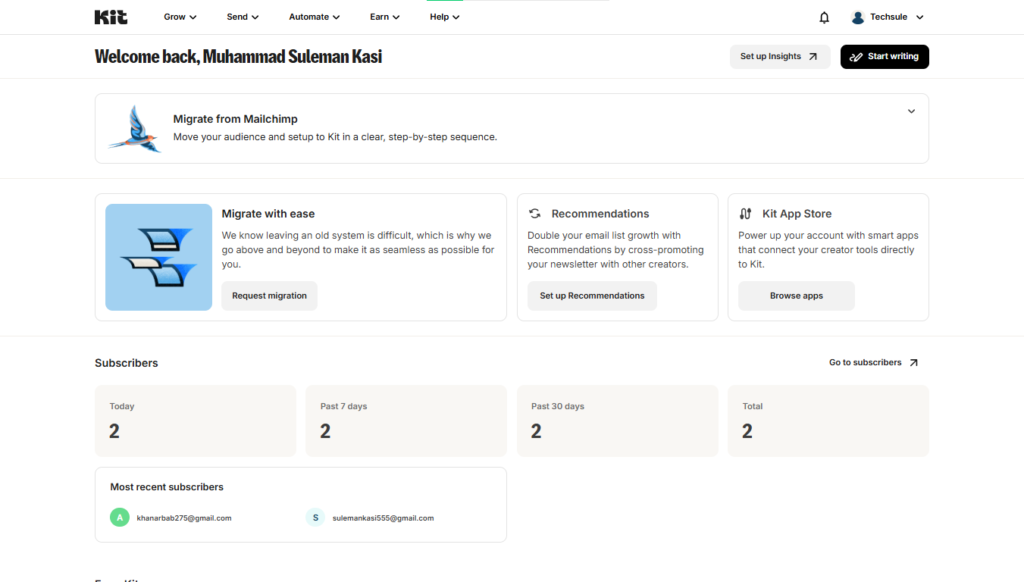
Kit Dashboard
Kit provides a clean and straightforward dashboard that focuses on email marketing, audience growth, and automation. The navigation is easy to understand, making it simple for creators and bloggers to find important tools without feeling overwhelmed.
Mailchimp Dashboard
Mailchimp offers a more feature-rich dashboard with access to email campaigns, audiences, automation journeys, reports, and other marketing tools. While it includes more options than Kit, new users may need some time to become familiar with the interface.
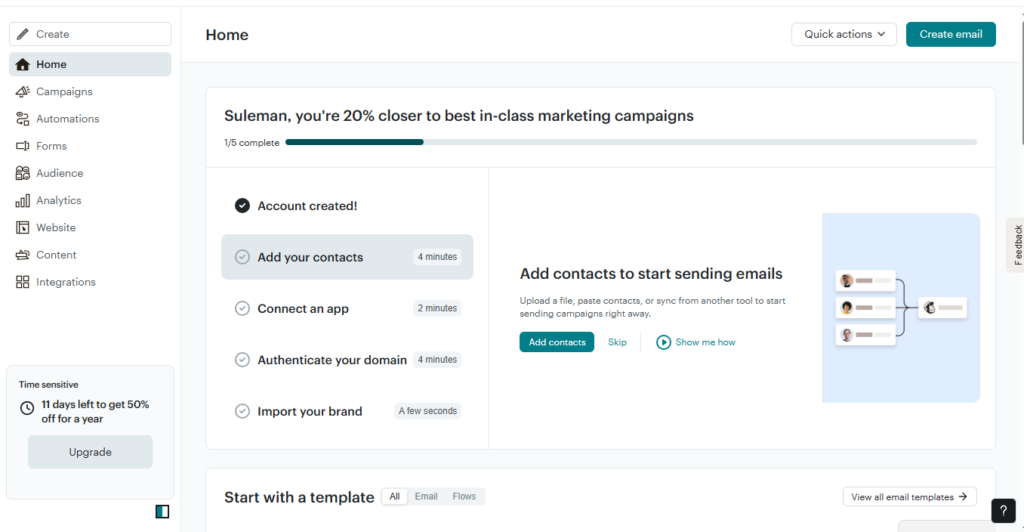
In terms of ease of use, Kit has an advantage for creators who prefer a simple and focused experience, while Mailchimp provides a broader marketing workspace for users who need additional tools beyond email marketing.
Takeaway: If your readers value speed and simplicity, Kit usually wins. If they expect a broader marketing workspace, Mailchimp’s extra complexity is often justified.
Email Editor and Templates
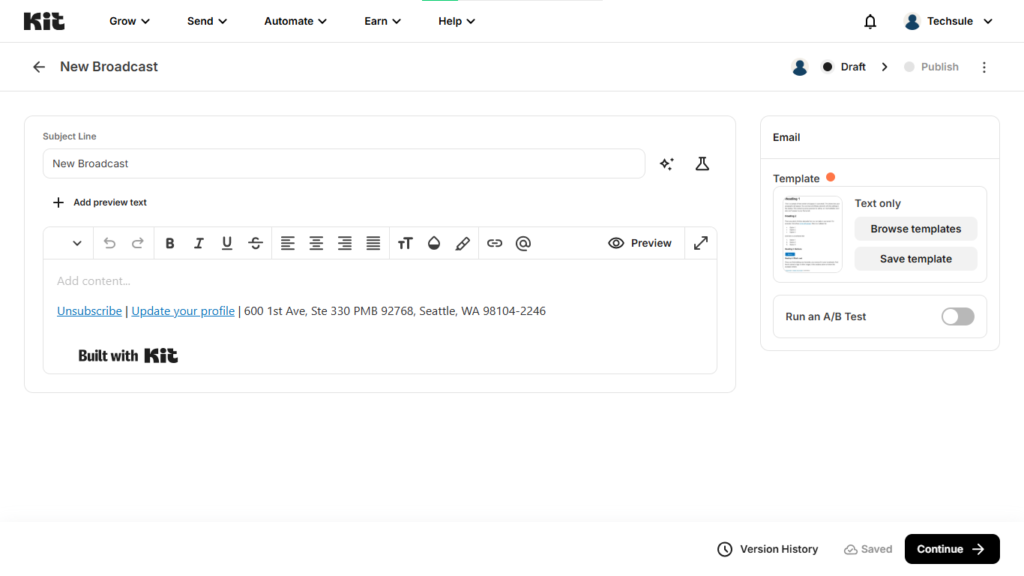
For actual writing and sending, Kit keeps things creator-centric. Its official email designer page highlights 40+ creator-made templates, conditional content, rich media integrations from Canva and Unsplash, reusable design assets, polls, and responsive layouts. That makes Kit a good fit for people who want newsletters to feel personal and fast to produce rather than heavily art-directed.
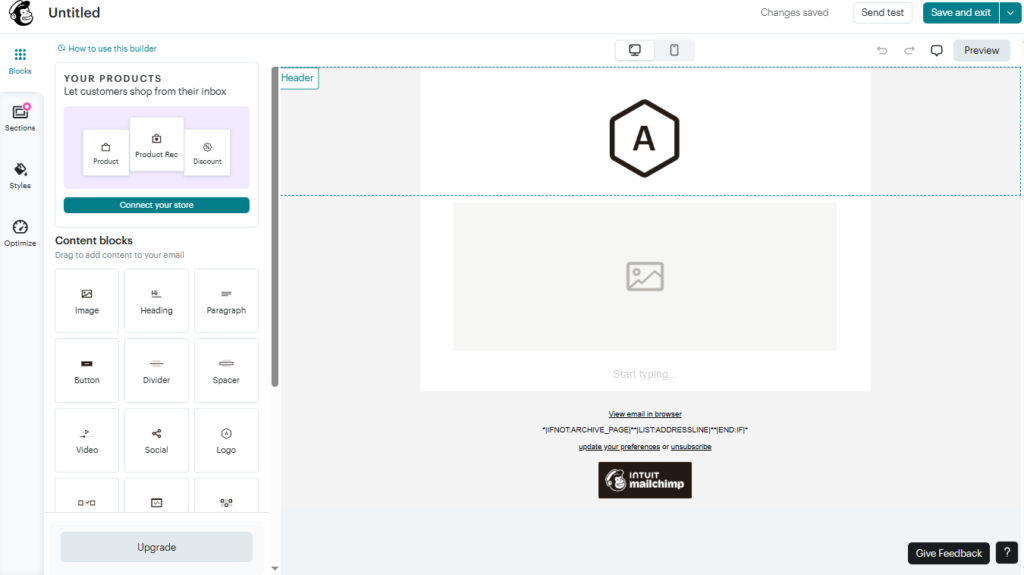
Mailchimp is stronger on visual design control. Officially, it offers more than 130 email templates, and its new builder uses drag-and-drop content blocks and layouts, while the legacy builder still supports custom-coded templates and RSS use cases. For brands that care about campaign layout, product blocks, image-heavy modules, or more polished promotional emails, Mailchimp has the deeper editor and larger template library.
In plain terms, Kit vs Mailchimp comes down to writing speed versus design flexibility. Kit feels faster for plain-text style newsletters, educational sequences, and creator email. Mailchimp feels better for branded campaigns, promotions, event emails, and ecommerce-style layouts.
Audience Management
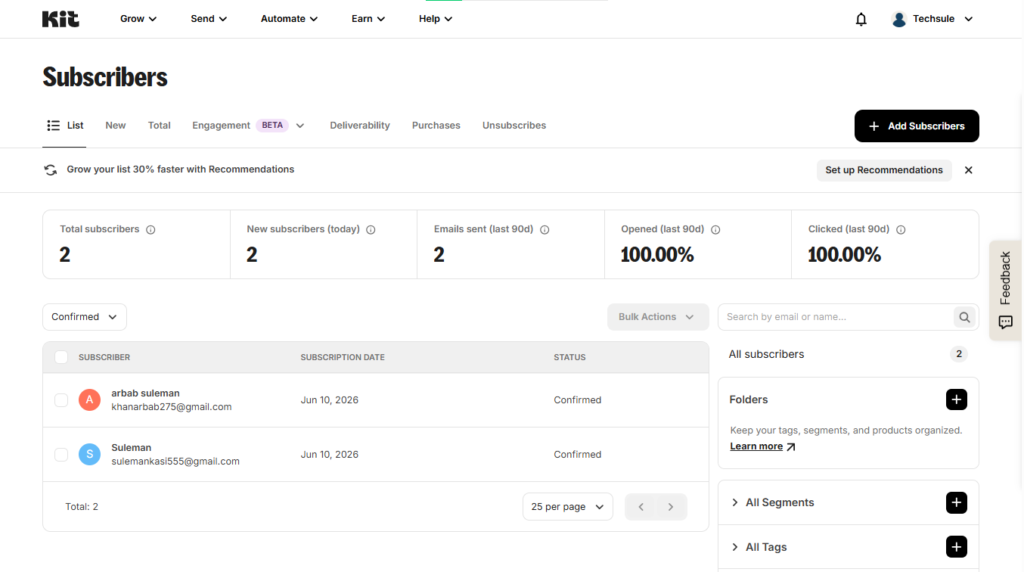
Audience structure is one of the biggest differences in this Kit vs Mailchimp comparison. In Kit, subscribers live in one list, and you organize them with tags and segments. Kit’s forms and tagging docs repeatedly emphasize that a subscriber can join multiple forms without becoming a billed duplicate, because the subscriber record stays unified. That model is cleaner for creators who need one person to move through multiple lead magnets, sequences, and offers over time.
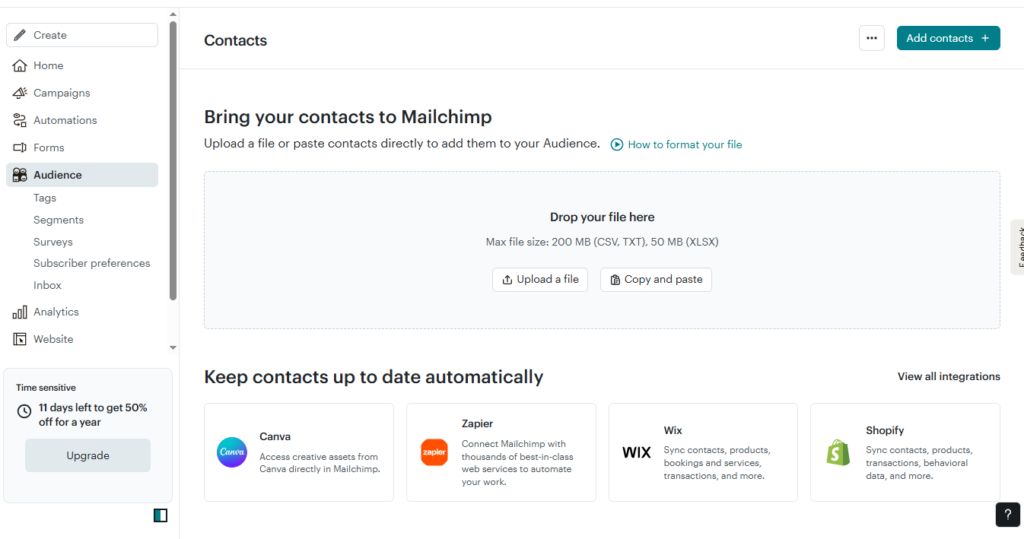
Mailchimp gives you more ways to organize contacts—audiences, tags, groups, and segments—and those tools are powerful. Mailchimp’s own docs recommend maintaining a primary audience and using tags and segmenting tools inside it. The reason is important: Mailchimp also states that contacts across audiences count toward your contact total, and subscribed, non-subscribed, and unsubscribed contacts all count toward paid limits. That means Mailchimp can feel more enterprise-friendly, but it also requires more discipline to avoid messy structure and unnecessary cost.
So who wins? Kit wins for structural simplicity and creator-friendly billing logic. Mailchimp wins for breadth of segmentation options, especially when a business wants tags, groups, audiences, and richer customer data in the same platform.
Automation Features
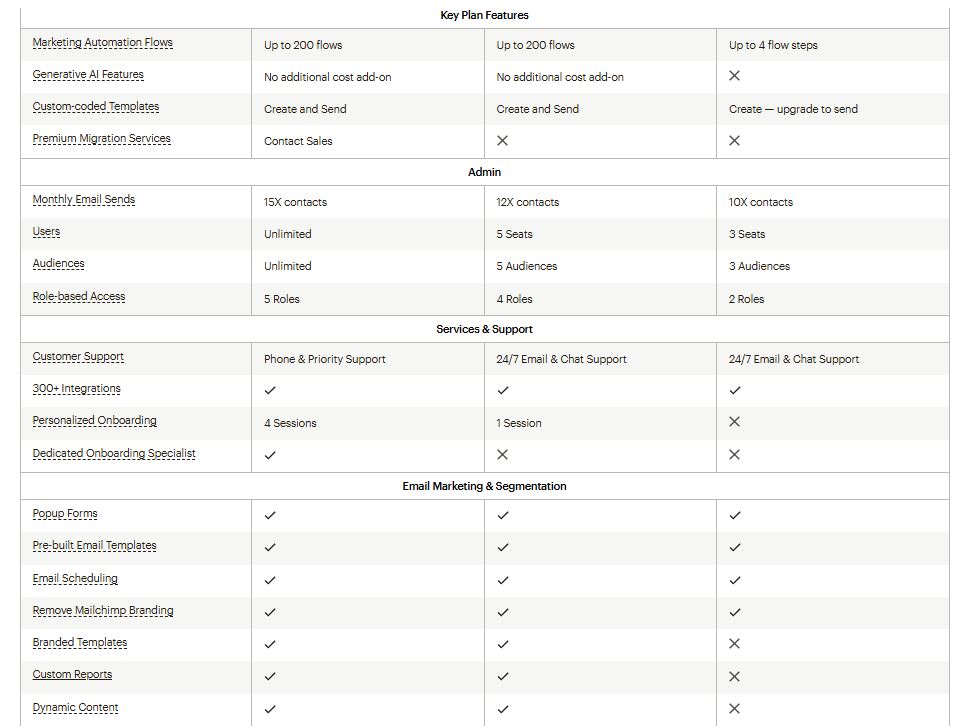
Automation is where the use-case split becomes very clear. Kit’s Visual Automations are built for welcome sequences, lead magnet delivery, tagging, branching by simple conditions, and content-driven nurture flows. On the free Newsletter plan, Kit includes one basic Visual Automation and one Sequence; on paid plans, official pricing adds unlimited automations and sequences. That makes Kit strong for creators who want practical email funnels without a lot of operational overhead.
Mailchimp goes further in automation depth. Official pricing docs say Essentials includes automation flows with up to four steps, while Standard adds expanded automation capabilities and flow templates. Mailchimp’s automation pages position these flows around customer journeys, branching logic, and behavior-based triggers, and third-party hands-on comparisons consistently score Mailchimp higher for advanced workflow breadth.
That means the real Kit vs Mailchimp automation verdict is nuanced: Kit is usually better for newsletter-first creators who need clarity and speed; Mailchimp is better for teams that want more event-based, multi-step, and broader marketing journeys.
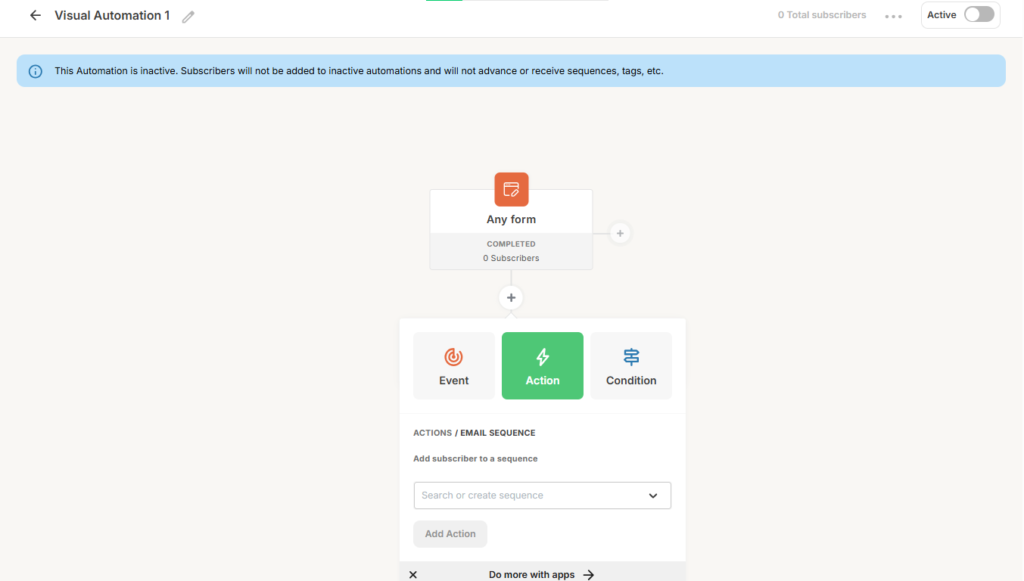
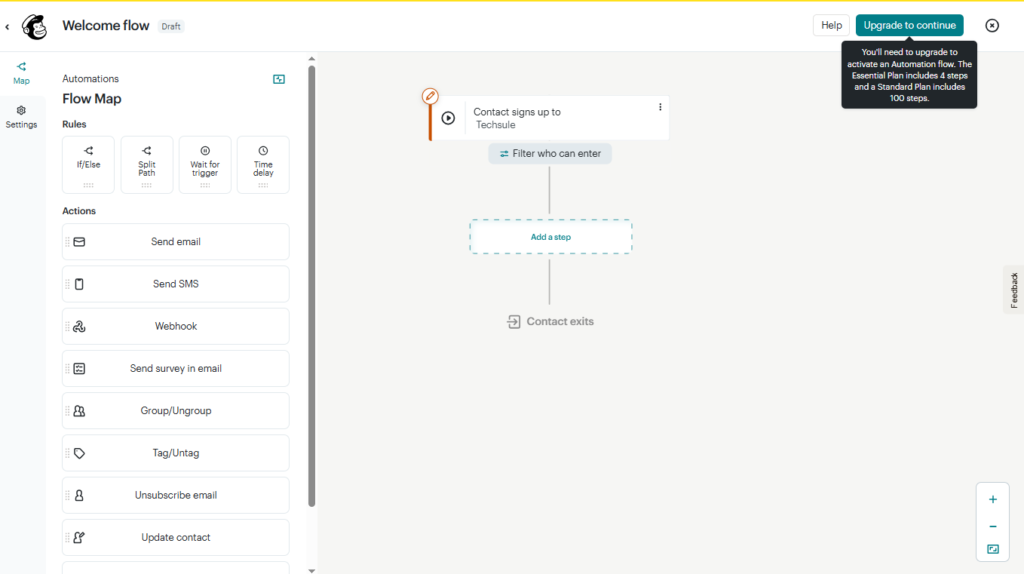
Takeaway: If your readers need simple but effective email funnels, Kit is a strong recommendation. If they want deeper branching and business-wide automation, Mailchimp has the edge.
Landing Pages and Forms
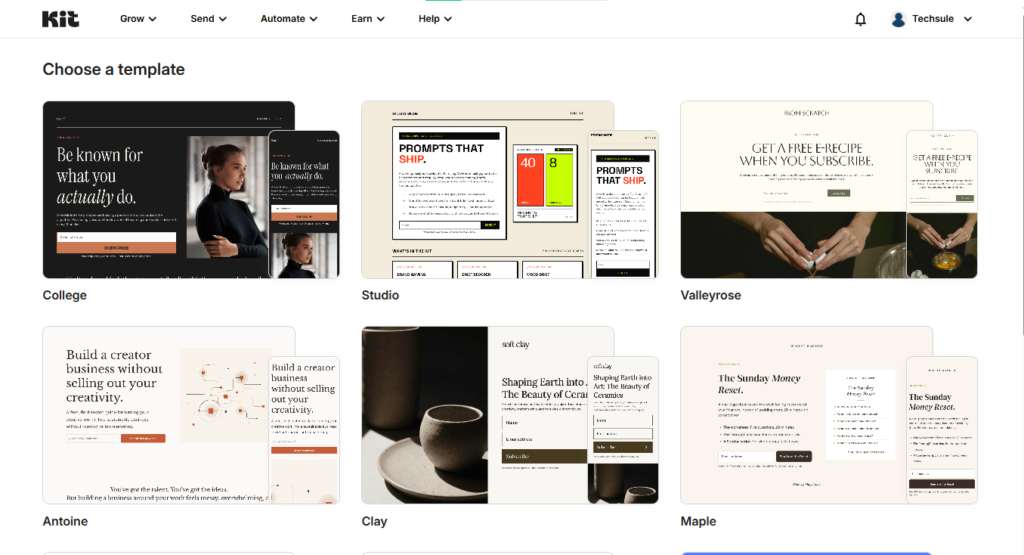
Kit is unusually generous here. Its official Newsletter plan includes unlimited forms and landing pages, and its forms documentation highlights inline, pop-up, slide-in, sticky bar, opt-in incentive delivery, double opt-in, GDPR options, and direct routing into automations. Its landing page builder also promises 20+ templates, custom branding, automation connections, and unlimited landing pages across all plans.
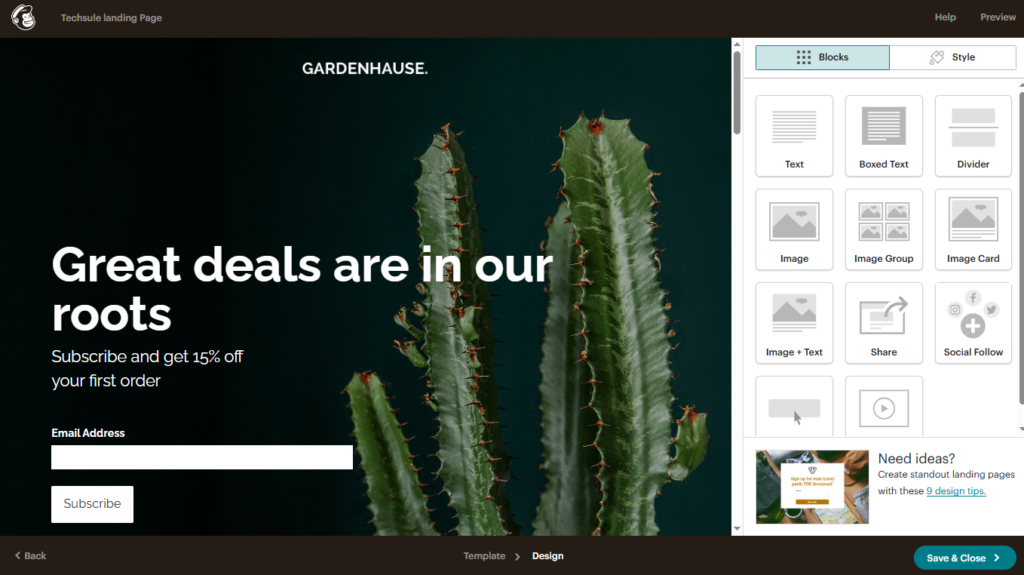
Mailchimp also performs well. Its landing page builder offers drag-and-drop editing, unlimited landing page subdomains, mobile page creation, audience/tag selection, and reporting on visitors, clicks, conversions, and revenue. Its form builder supports signup forms, response pages, and other stages of the signup process, which makes it a better fit for businesses that want more design control and tighter integration with broader campaigns.
The practical difference is speed versus polish. Kit is excellent for fast lead magnets, webinar signup pages, and newsletter growth. Mailchimp is stronger when the page itself is part of a more branded campaign journey.
Email Deliverability
Both platforms take deliverability seriously, and both support sender authentication. Kit’s verified sending domain docs explicitly cover SPF, DKIM, and DMARC, and Kit also promotes double opt-in on forms and claims a 99.8% average email delivery rate on its email marketing page.
Mailchimp also supports authentication and gives users a more guided setup flow, including automated domain authentication options. Its deliverability documentation emphasizes domain verification, email authentication, compliance, bounce management, and warnings against free email sending addresses. For beginners, this setup path can be easier to follow than Kit’s more manual approach.
Third-party verdicts are not perfectly aligned. EmailToolTester’s 2026 comparison gives Kit a slight edge for long-term inbox placement, while SendPulse scores Mailchimp slightly higher because of guided setup and broader deliverability tools. The safest editorial conclusion is that list quality, authentication, and sending discipline matter more than brand choice once you narrow the field to these two credible providers.
Integrations
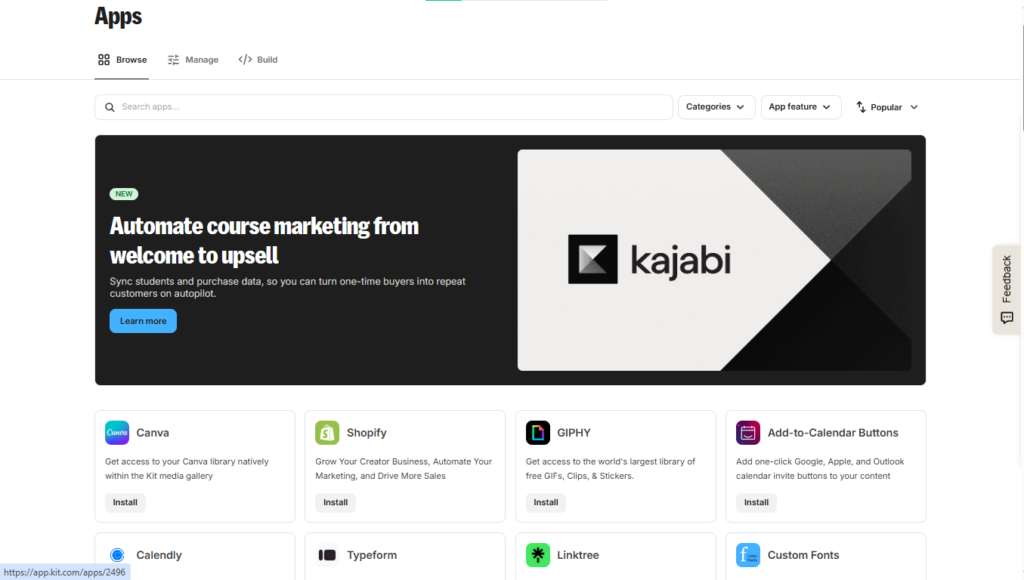
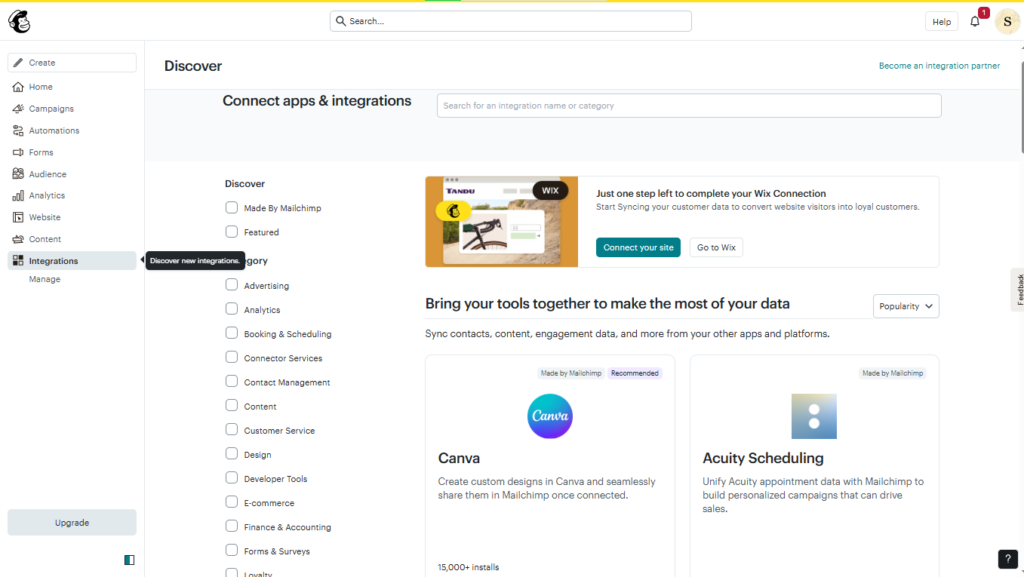
Kit’s integration story is narrower but more relevant for creators. Officially, Kit advertises 100+ direct apps, and its App Store documentation shows connections with WordPress, Shopify, Stripe, Teachable, Kajabi, Patreon, Canva, Typeform, Calendly, Leadpages, Mighty Networks, and Zapier. That is a strong stack for newsletter businesses, courses, memberships, and creator monetization.
Mailchimp wins on breadth. Its integrations directory advertises 300+ integrations and spans ecommerce, analytics, booking, loyalty, forms, content, payments, social media, and more. It also prominently features Shopify, WooCommerce, Canva, Zapier, Square, Wix, Squarespace, Stripe, Salesforce, WordPress, and Facebook. For small business owners who already use a mixed software stack, Mailchimp will usually connect to more of it natively.
So the integrations winner depends on angle: creator relevance favors Kit; total ecosystem size favors Mailchimp. For a general comparison article, Mailchimp should get the point on breadth, while Kit should get credit for tighter creator-stack alignment.
Analytics and Reporting
Kit’s analytics are built around creator decisions. Officially, Kit emphasizes seeing which subscribers are most engaged, where they came from, and how long they stay. On higher plans, Kit adds engagement analytics, subscriber engagement scoring, deliverability reporting, and an insights dashboard. For newsletter operators, that is a useful middle ground between basic campaign stats and true business insights.
Mailchimp remains stronger for reporting depth. Its reports and analytics page covers opens, clicks, revenue, unsubscribes, and cross-channel reporting, while its audience dashboard includes growth, tags, customer lifetime value, purchasing likelihood, predicted demographics, engagement, and top locations. Its pricing docs also reserve advanced segmentation, custom reports, and richer analytics for higher plans, especially Standard and Premium.
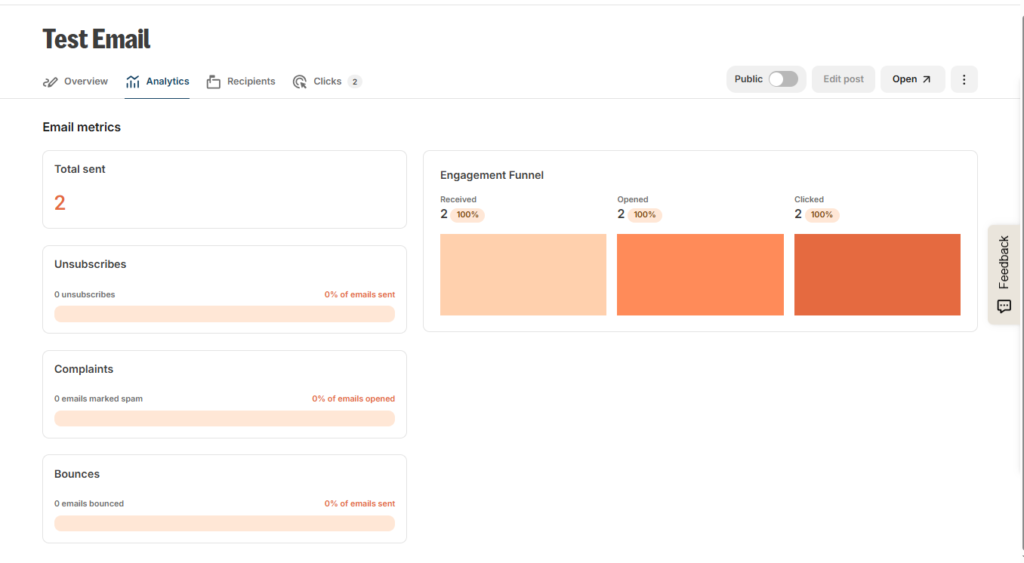
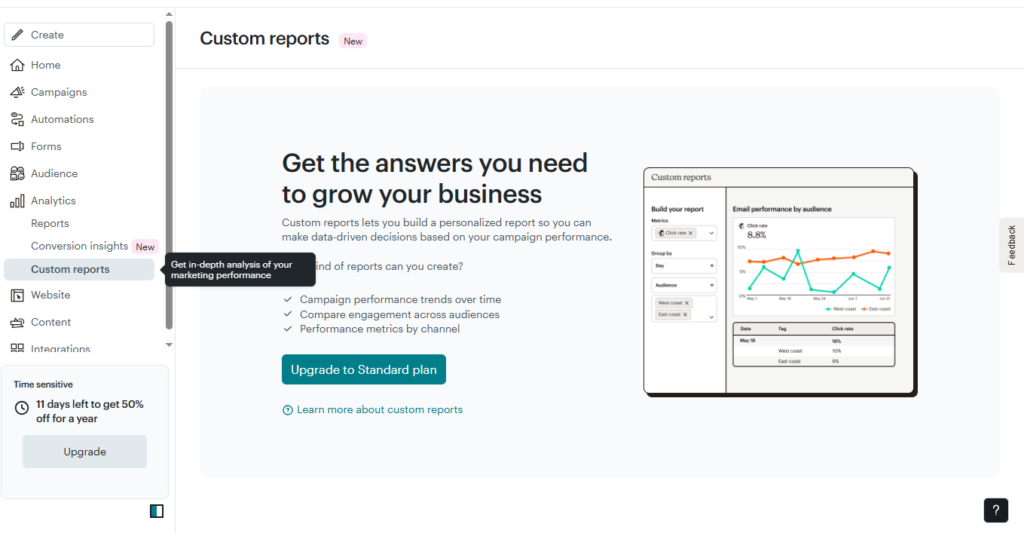
For a blogger or paid newsletter writer, Kit usually provides enough signal to optimize. For an ecommerce brand or marketing team that needs multi-campaign analysis and revenue visibility, Mailchimp’s analytics stack is more complete.
Pricing and Plans
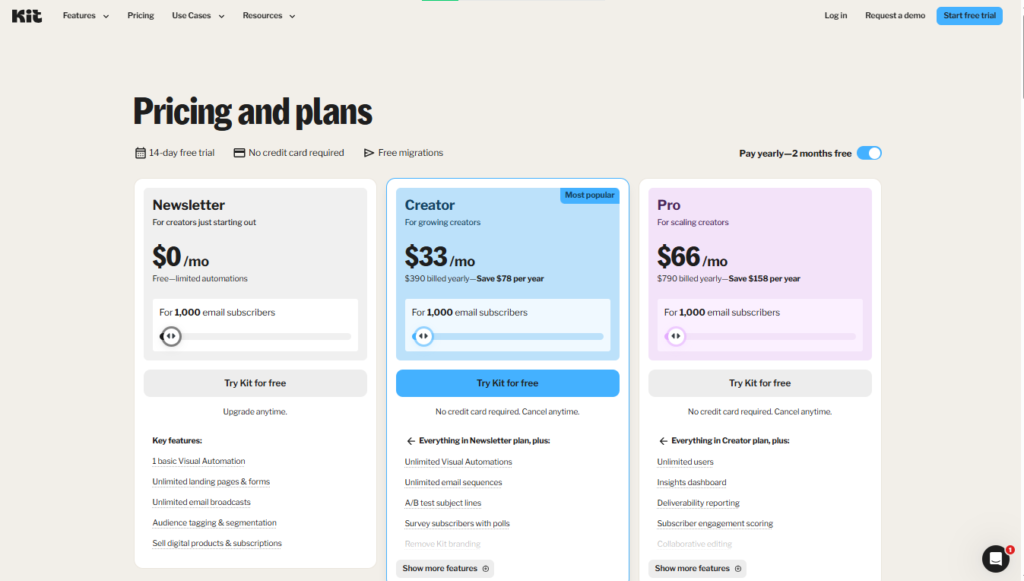
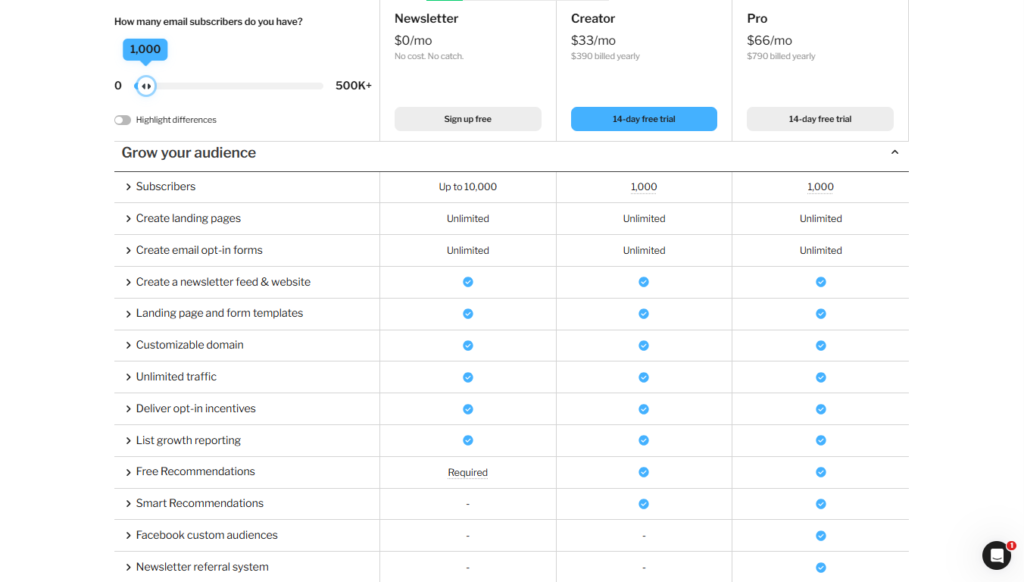
Pricing is one of the strongest reasons people search Kit vs Mailchimp. Kit’s official pricing is much easier to interpret: Newsletter is free, Creator is $33 per month billed yearly for 1,000 subscribers, and Pro is $66 per month billed yearly for 1,000 subscribers. Kit’s free Newsletter plan officially supports up to 10,000 active unique subscribers, unlimited email sends, unlimited forms and landing pages, digital products and subscriptions, and one basic visual automation with one sequence.
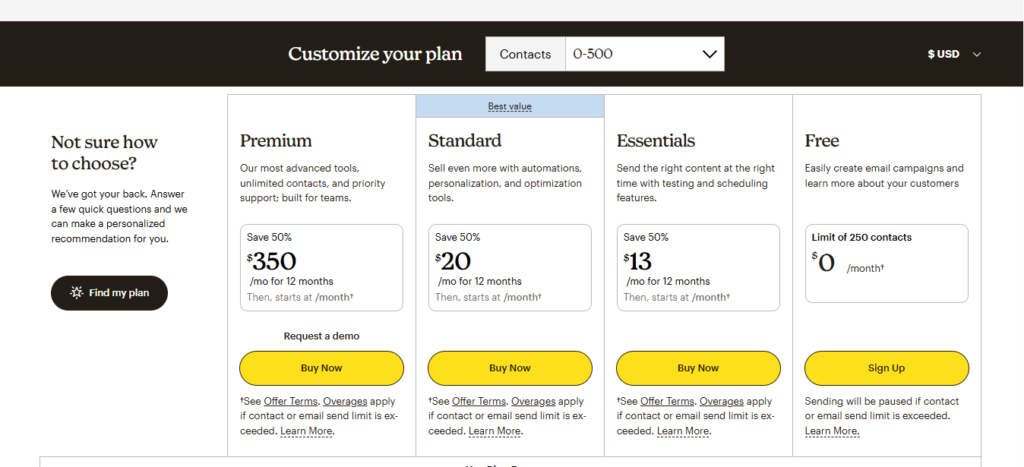
Mailchimp’s pricing structure is more layered. Officially, the Free plan includes up to 250 contacts and 500 sends per month. Essentials and Standard start at 500 contacts and scale by contact tier; Premium starts at 10,000 contacts. Mailchimp also counts subscribed, non-subscribed, and unsubscribed contacts toward limits, and its paid tiers are based on contacts stored across all audiences. The live pricing page is localized and can include trials or promotions, so the safest editorial approach is to describe the structure and then note that exact quotes should be verified before publishing.
For readers who want a practical benchmark, recent third-party comparisons put Mailchimp at roughly $45 per month for 2,500 contacts and about $110 per month for 10,000 contacts on commonly compared paid tiers, while also noting that Mailchimp’s first-year pricing can differ from later renewal pricing. Those same comparisons confirm Kit’s free plan is far more generous and that Mailchimp can be slightly cheaper at some mid-range list sizes depending on plan choice.
| Comparison point | Kit | Mailchimp |
|---|---|---|
| Plan name | Newsletter, Creator, Pro | Free, Essentials, Standard, Premium |
| Free limits | Up to 10,000 active unique subscribers; unlimited email sends; unlimited forms and landing pages; 1 basic Visual Automation and 1 Sequence | Up to 250 contacts; 500 sends per month; daily cap 250; 1 audience; basic templates; one-click welcome email; basic reporting |
| Price tiers | Newsletter: $0. Creator: $33/mo billed yearly for 1,000 subscribers. Pro: $66/mo billed yearly for 1,000 subscribers. | Free: $0. Essentials and Standard start at 500 contacts and scale upward. Premium starts at 10,000 contacts. Exact displayed prices vary by market, calculator settings, and promotions. |
| Key features | Single subscriber database, tags and segments, creator monetization, paid newsletters, digital products, automations on paid plans, 100+ direct apps | Larger template library, broader reporting, advanced segmentation on higher tiers, multivariate testing, Premium phone support, 300+ integrations |
This table compiles official plan structures and features from Kit and Mailchimp. Pricing, plan limits, and included features may change over time. The information shown here reflects the plans available at the time of writing.
Kit Pricing
Kit offers one of the most generous free plans in the email marketing industry, supporting up to 10,000 subscribers with unlimited email sends. Its paid plans focus on creators who need advanced automations, audience segmentation, and monetization tools as their newsletters grow.
Mailchimp Pricing
Mailchimp uses a tiered pricing structure based on contact limits and feature access. While its free plan is more restrictive than Kit’s, higher-tier plans unlock advanced reporting, automation, and marketing tools for growing businesses.
Kit Features
Kit’s feature set is designed primarily for creators, bloggers, coaches, and newsletter publishers. Tools such as visual automations, subscriber tagging, landing pages, and paid newsletters make it easy to build and monetize an audience.
Mailchimp Features
Mailchimp provides a broader marketing toolkit that extends beyond email campaigns. Its features include advanced templates, customer journeys, audience segmentation, analytics, and extensive integrations for businesses and ecommerce brands.
Takeaway: If affordability and generous free-plan limits are your top priorities, Kit offers better value for most creators and newsletter publishers. Mailchimp provides more business-oriented features, but its pricing can become expensive as your subscriber list grows. For most beginners and content creators, Kit is the more cost-effective choice.
Customer Support
Kit is stronger than many people expect. Its support pages promise 24/7 team availability, in-app chat via Intercom, email support for more complex issues, and a sizable knowledge base. Kit also states that even free Newsletter plan users receive support, though response times for free users may be slower than for paid accounts. Paid plans add 24/7 email and chat support, while Pro adds priority support, and Kit also promotes free migration help from another platform.
Mailchimp support is more tier-dependent. Officially, new Free accounts get 30 days of email support, then chatbot support remains. Essentials and higher add 24/7 chat and email support, while Premium adds phone support and screen sharing. Mailchimp also offers assisted onboarding for Standard and Premium users during the first 90 days. That means Mailchimp’s support can be excellent, but smaller users will feel more plan restrictions than they would with Kit.
For solo creators and migrations, Kit feels more accessible. For larger teams that want structured onboarding and phone access, Mailchimp becomes more appealing at the upper tiers.
Kit vs Mailchimp: Pros and Cons
A strong Kit vs Mailchimp article should not pretend there is one universal winner. The right choice depends on whether the reader values creator simplicity, monetization, and single-list organization, or broader design control, analytics, and integrations.
| Feature/Area | Kit (pros/cons) | Mailchimp (pros/cons) |
|---|---|---|
| Ease of use | Pros: focused interface, fast for creators, simpler subscriber model. Cons: fewer business extras. | Pros: approachable onboarding, broad toolkit. Cons: more layers and navigation. |
| Email editor | Pros: faster writing workflow, creator-style templates, good personalization. Cons: smaller template library. | Pros: stronger drag-and-drop design control, larger template library, custom-code options. Cons: can feel heavier for simple newsletters. |
| Audience structure | Pros: one list, tags and segments, fewer duplicate-billing issues. Cons: less complex data structure. | Pros: tags, groups, segments, richer business-style organization. Cons: multiple audiences can inflate complexity and cost. |
| Automations | Pros: clean visual automations for welcome and nurture flows. Cons: less advanced for complex multi-channel journeys. | Pros: deeper branching, more triggers, broader workflow scope. Cons: more setup time and plan gating. |
| Analytics | Pros: actionable creator metrics, better on higher Kit plans. Cons: less depth than Mailchimp. | Pros: stronger dashboards, revenue reporting, audience insights. Cons: some best reporting requires higher tiers. |
| Pricing | Pros: very generous free plan, clearer creator-focused value. Cons: can become premium-priced at scale. | Pros: sometimes competitive at selected mid-range tiers. Cons: restrictive free plan, contact counting rules can surprise users. |
This table synthesizes official product documentation with recent hands-on comparisons from EmailToolTester and SendPulse.
Takeaway: : Both Kit and Mailchimp offer strong email marketing capabilities, but they are designed for different types of users. Kit stands out for its creator-focused experience and ease of use, while Mailchimp provides a broader set of marketing tools for businesses and growing teams.
Kit vs Mailchimp: Final Verdict
For most creators, Kit vs Mailchimp is not a close call: Kit is usually the better fit. Its single-list subscriber model, generous free plan, creator monetization tools, built-in paid newsletters, tags and segments, and simpler automation philosophy all line up with how creators actually run newsletter businesses. If the reader is a blogger, coach, podcaster, course seller, or newsletter-first operator, Kit is the platform that makes the most sense most of the time.
Mailchimp is still the better pick for a different type of reader: the small business owner, ecommerce brand, or marketing team that wants deeper templates, broader automation, stronger reporting, and a larger integration ecosystem. If a business already works across campaigns, products, CRM-style audience data, and design-heavy emails, Mailchimp often justifies its extra complexity.
Final Recommendation: Choose Kit for creators and newsletter businesses. Choose Mailchimp for broader small-business marketing and ecommerce needs.
Conclusion: Which Email Marketing Platform Is Better?
When comparing Kit vs Mailchimp, both platforms offer powerful email marketing features, but they are built for different types of users.
Kit is designed specifically for creators, bloggers, newsletter publishers, coaches, and online entrepreneurs who want a simple platform focused on audience growth and email automation. Its clean interface, subscriber-centric approach, visual automations, and generous free plan make it an excellent choice for content creators and personal brands.
Mailchimp, on the other hand, is a broader marketing platform that appeals to businesses needing advanced templates, extensive integrations, detailed analytics, and additional marketing tools beyond email. It can be a strong option for ecommerce stores, agencies, and businesses with more complex marketing requirements.
If your primary goal is building a newsletter, growing an audience, and creating automated email funnels with minimal complexity, Kit is often the better choice. If you need a wider range of marketing features, advanced reporting, and extensive third-party integrations, Mailchimp may be the better fit.
Ultimately, the winner of this Kit vs Mailchimp comparison depends on your business goals, budget, and experience level. Consider taking advantage of the free plans offered by both platforms to test their features and determine which one best supports your email marketing strategy.