
Executive Summary
MailerLite and ActiveCampaign are two popular email marketing platforms that serve different audiences and needs. MailerLite is an affordable, user-friendly tool aimed at small businesses, bloggers, and creators who need core email marketing and simple automation features. It offers a generous free plan (up to 250 subscribers, 2,500 emails) and straightforward tools for building emails, landing pages, and forms.
ActiveCampaign, by contrast, is a feature-rich automation platform designed for enterprises, eCommerce brands, and advanced marketers. It combines email marketing with a built-in CRM, complex multi-channel automations, and advanced analytics, but comes at a higher price and with a steeper learning curve.
Our in-depth comparison below covers all key aspects of “MailerLite vs ActiveCampaign”. We’ll look at ease of use, email editors, automation capabilities, subscriber management/CRM, landing pages and forms, deliverability, integrations, reporting, pricing, and support.
Table of Contents
MailerLite vs ActiveCampaign: Quick Overview
To start, here’s a side-by-side snapshot of how the two platforms compare across major categories:
| Feature | MailerLite | ActiveCampaign |
|---|---|---|
| Target Audience | Small businesses, solopreneurs, bloggers, digital creators | Enterprise, eCommerce brands, advanced marketers |
| Free/Trial Plan | ✅ Free plan (up to 250 subscribers, 2,500 emails) | ❌ No free plan (14-day trial only) |
| Pricing (10K contacts) | ~$73 (Power plan) with unlimited sends | ~$189 (Starter plan)–$419 (Pro plan) plus user/send limits |
| Ease of Use | ⭐⭐⭐⭐⭐ Very easy and intuitive for beginners | ⭐⭐⭐ Complex; basic tasks easy, advanced tasks require learning |
| Email Editor | Drag-and-drop, rich text, or HTML editors; many templates | New drag-and-drop builder (2022), structures/blocks, 150+ templates |
| Automation | Good for most needs; included on free plan; multi-step workflows, triggers, delays, A/B tests | Extremely powerful; 900+ automation recipes, AI builder; multi-channel triggers and conditional logic |
| Subscriber Mgmt/CRM | Lists, tags, and segments; no built-in sales CRM | Full CRM with deals, lead scoring, pipeline management integrated with email |
| Landing Pages & Forms | Easy drag-and-drop builder; supports websites, landing pages, pop-ups | Landing page and form builder (templates available); no built-in website builder |
| Email Deliverability | Strong deliverability (recent tests ~80.5% inbox); industry-best practices (carrier compliance, verification) | Market-leading deliverability (~94.2% inbox in Jan 2024) due to strong infrastructure and authentication |
| Integrations | ~130+ native integrations; 5,000+ via Zapier | ~900+ native integrations (Shopify, Salesforce, etc.); extensive webhook/API support |
| Reporting | Standard campaign & automation stats; easy-to-read graphs | In-depth analytics (engagement, revenue attribution, CRM pipeline, custom reports) |
| Customer Support | 24/7 email/chat on paid plans; highly-rated support | Email/chat support (24/7 on higher tiers); mixed reviews on responsiveness |
This overview highlights the main trade-offs: MailerLite offers simplicity, affordability, and a great free tier, making it ideal for small to mid-sized lists. ActiveCampaign packs advanced features (automation, CRM, analytics) designed for growth and enterprise use, but it costs more and can be complex to set up.
We will dive into each aspect in detail below, using up-to-date data and third-party tests to ensure accuracy. The tables will help you compare core offerings at a glance. (All prices are in USD).
Ease of Use
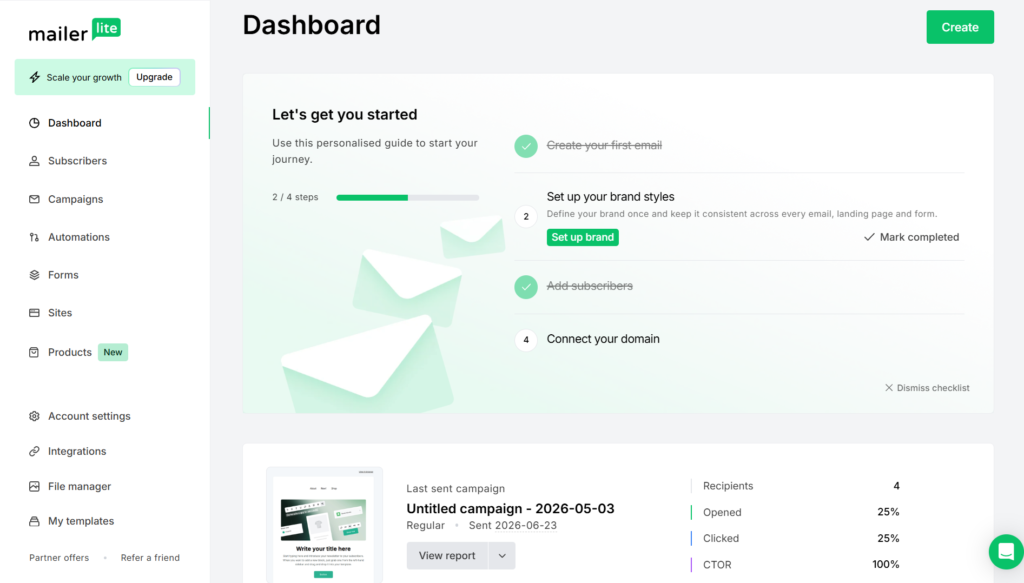
In the MailerLite vs ActiveCampaign comparison, ease of use is one of the biggest differences. MailerLite is renowned for its clean, user-friendly interface. Reviewers consistently describe it as intuitive, with a gentle learning curve. For example, one expert calls MailerLite “incredibly easy to learn” – tasks like designing pop-ups and landing pages feel “intuitive” from the start. It offers a simplified dashboard and clear menu labels, so beginners can quickly figure out where to create a campaign, a form, or a website. A hands-on review found MailerLite “easy to use and easy to set up,” even for new users. Built-in guidance and tutorials further smooth the learning process.
In contrast, ActiveCampaign is more complex. It bundles email marketing with a CRM and advanced automation, which means the interface has many more features and menu options. Basic tasks like sending a campaign or building a simple automation are fairly straightforward, but more advanced workflows often require digging into documentation. The Zapier comparison gave ActiveCampaign a 3/5 for ease-of-use: “Basic functions like email campaigns are easy enough; advanced tasks often require reviewing FAQs”. The Appvizer review similarly warns of a “steep learning curve” and that the interface isn’t “always intuitive,” especially for non-technical users.
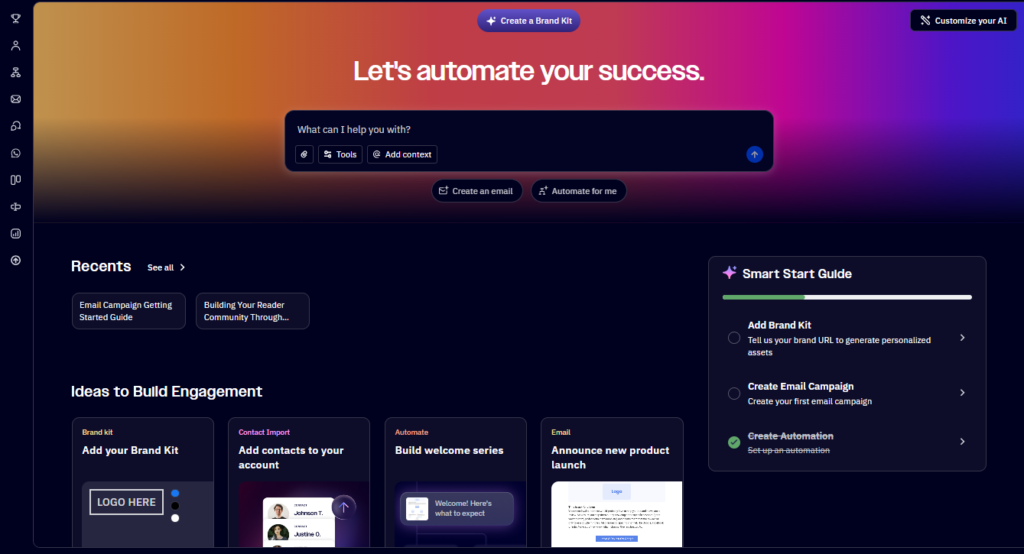
In practice, this means beginners and small teams will find MailerLite’s simplicity a huge plus, while experienced marketers won’t mind ActiveCampaign’s complexity because of its power. We assume our reader is a small business or creator who values straightforward setup; in that case, MailerLite’s generous free plan (up to 250 subscribers) and no-cost onboarding is a clear advantage.
Email Editor & Templates
Both platforms offer a drag-and-drop email editor with pre-designed templates, but the approach and features differ:
- MailerLite’s Editor: MailerLite provides three editor modes: drag-and-drop (WYSIWYG), rich-text (simple text-based), and custom HTML. You can create emails from scratch or start from one of many built-in templates. The editor includes modular “content blocks” (headers, text, images, buttons, etc.) that you can drag into your layout. One reviewer praises MailerLite’s editor as “strong” with “great pre-made modules,” making it quick to build and customize emails. All three editors (including HTML and “simple” text) are available even on the free plan, so you get full design flexibility from the start.
- ActiveCampaign’s Email Designer: ActiveCampaign revamped its email designer in 2022 to make it more user-friendly. It uses a block-and-structure model: you first pick a layout structure (e.g. one column, two columns) then fill it with content blocks (text, image, button, social, etc.). The tool is powerful – it supports responsive design settings, global styles, and even dynamic (conditional) content if you upgrade – but there’s more to learn.
- ActiveCampaign includes hundreds of pre-built templates. Notably, its AI Brand Kit can auto-generate campaign templates using your logo and color scheme. The platform also offers goal-based template libraries (e.g. “Announcement”, “Newsletter”) as well as blank layouts. All templates are fully mobile-responsive and editable. A key point: when you pick a new “Email Designer” template, it uses the updated editor launched in 2022, which many users find easier than the old classic designer.
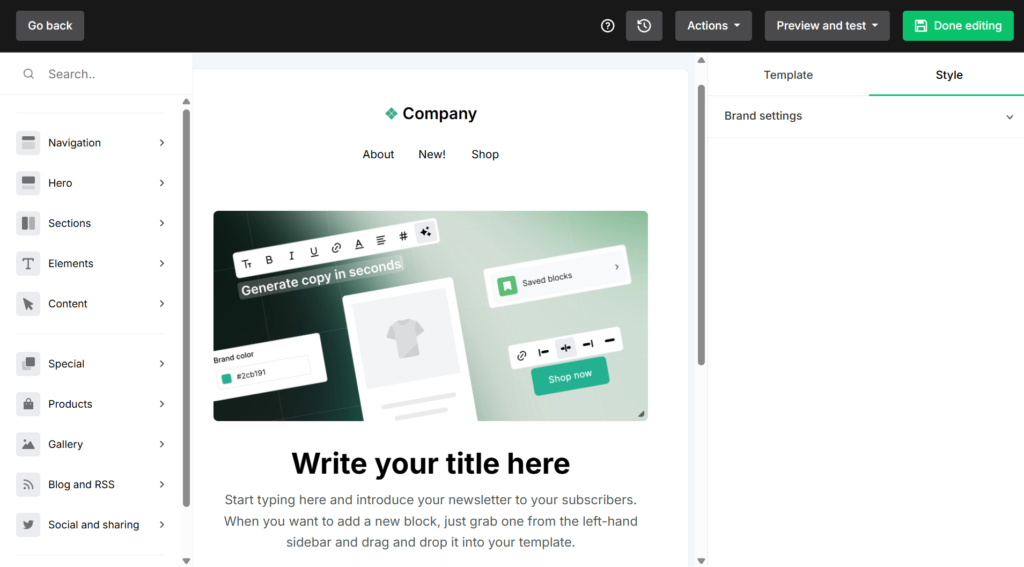
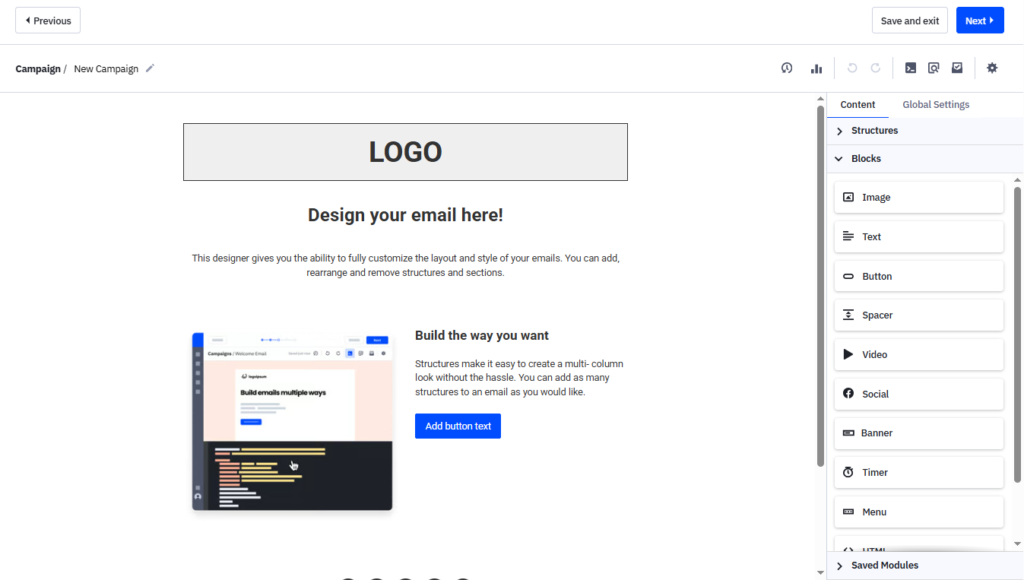
Templates: Both platforms have a library of responsive templates. ActiveCampaign’s templates are particularly extensive: by design, every campaign you send can be saved as a template, and there are built-in categories (Updates, Announcements, Newsletters, etc.). The ActiveCampaign docs note that all their templates are mobile-friendly and “easy to customize” with the drag-and-drop designer. MailerLite’s templates are similarly mobile-responsive, and the Power plan even includes AI-assisted design. (MailerLite recently launched an AI email generation feature, though it’s currently more modest – e.g. subject line suggestions – than ActiveCampaign’s AI tools.)
Overall, the MailerLite vs ActiveCampaign comparison shows that MailerLite offers a quick setup with straightforward editors and enough templates for most businesses. ActiveCampaign offers more advanced tools (like conditional content blocks and AI templates), which can improve brand consistency and productivity, but at the cost of additional complexity. A useful tip: both systems let you use the editor in automations as well as one-off campaigns (so you can template your welcome series, for example).
Email Automation
Automation is where ActiveCampaign truly excels, but MailerLite covers the essentials at an excellent price point:
- MailerLite Automations: MailerLite provides a visual workflow builder that supports triggers, delays, conditional splits, and actions (e.g. send email, apply tag). The free plan already includes automation, which is rare among email tools. MailerLite’s available triggers include common events like “subscriber joins group,” “subscriber clicks a link,” “subscribes via form,” as well as date-based triggers (e.g. anniversary or birthday). Each step can be an email, a delay, a condition (Yes/No branching), or an action (tagging, updating fields, etc.). Multi-trigger workflows and A/B split testing are available. A reviewer notes that MailerLite’s “no-nonsense automation editor” has all the basic elements you need (emails, delays, conditions) and is included on every plan. It may lack some super-advanced triggers (like website visit or product purchase out-of-the-box), but you can often achieve similar effects by integrating with your store or using the API.
- ActiveCampaign Automations: ActiveCampaign’s marketing automation is widely regarded as industry-leading. It supports virtually any trigger (site visits, ecommerce events, tags applied, form submissions, purchases, lead score changes, etc.) and any action (including CRM updates). Zapier’s comparison calls it “unparalleled email automation power and flexibility,” with a vast template library of 950+ starter workflows plus a new AI-based workflow builder.
- You can create complex, branched sequences with dozens of steps, connecting marketing and sales touchpoints. ActiveCampaign also includes features like conditional content within emails, goal tracking, split automations (forking the sequence by criteria), and even predictive sending powered by AI (on Pro and Enterprise plans). In short, ActiveCampaign lets you automate multi-step customer journeys in detail.
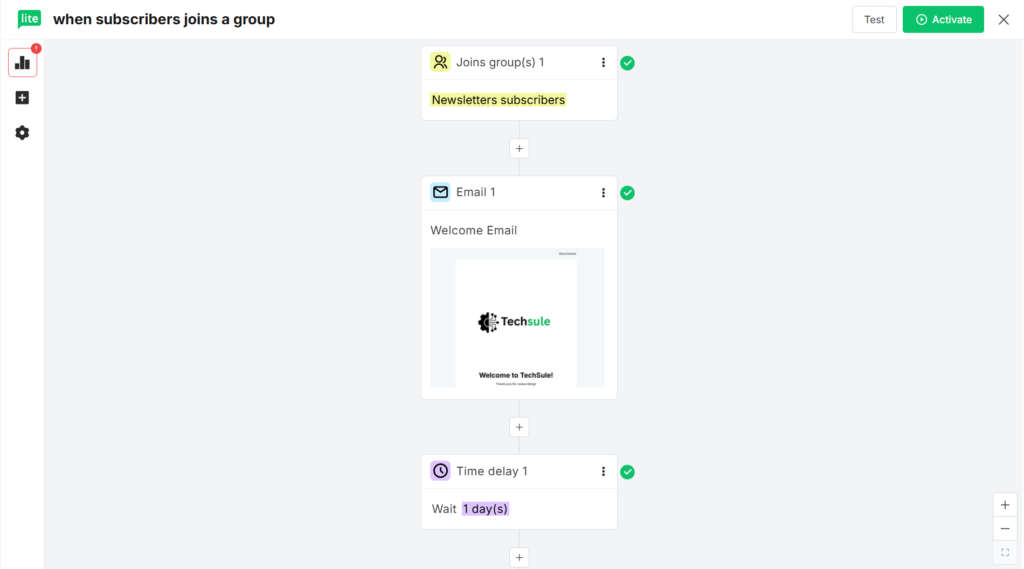
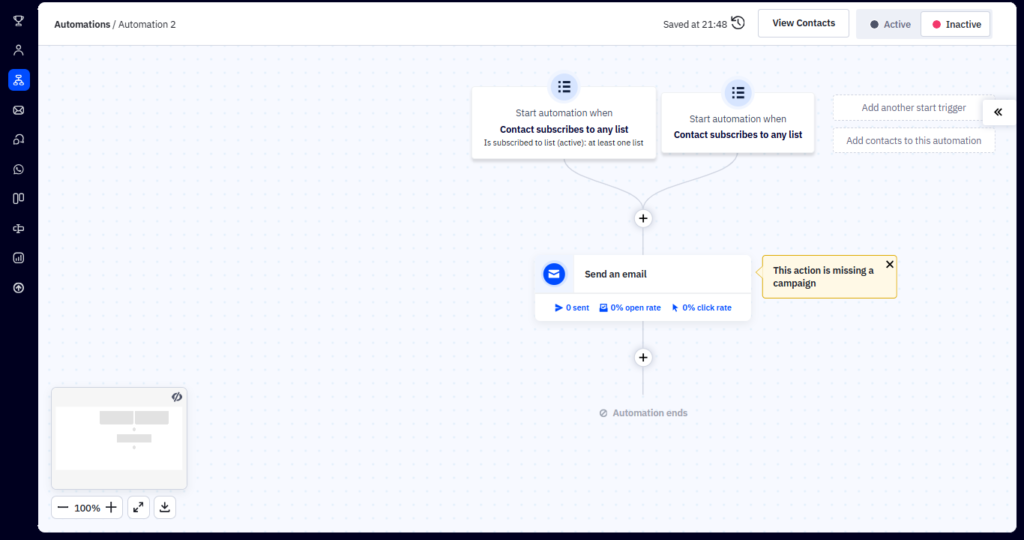
By comparison, MailerLite is better suited for simpler automation workflows, allowing users to create effective sequences with emails, delays, conditions, and actions while keeping the setup straightforward for most small businesses.
Key takeaway: MailerLite offers strong automation for the price – it’s free even for small accounts and sufficient for most small-business use cases. ActiveCampaign offers industry-leading automation (with an AI assistant for building workflows), suitable for advanced marketers or sales teams. If you have straightforward email sequences, MailerLite can handle them easily; if you need enterprise-grade journeys connecting marketing and sales, ActiveCampaign has the edge.
Subscriber Management & CRM
This category often shapes the decision:
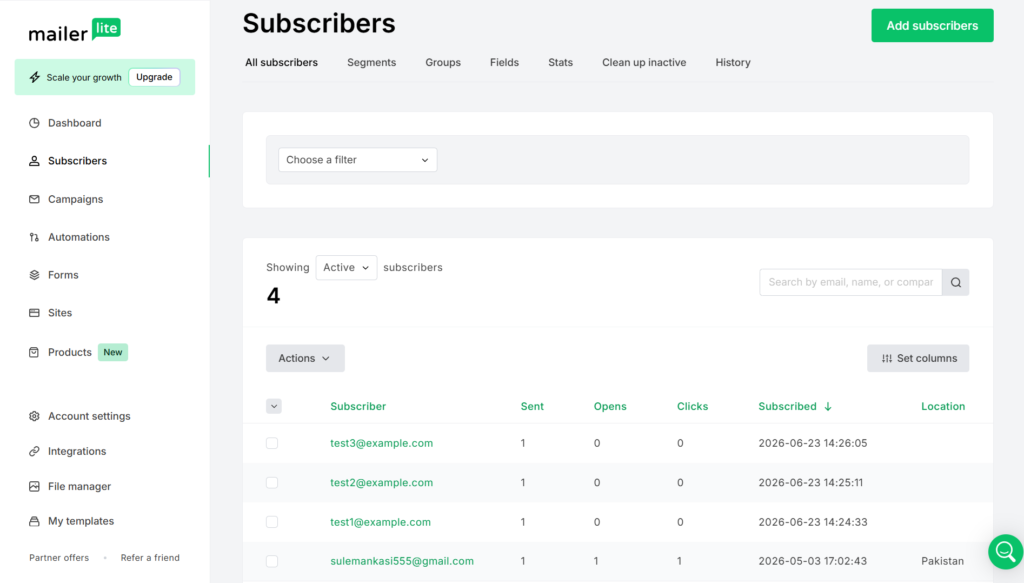
- MailerLite Subscriber Management: MailerLite provides list and segment tools typical of an email platform. You can create groups and segments of subscribers based on fields or behaviors (e.g. open/click events). You can also define custom fields for richer profiles. An interesting feature is MailerLite’s “Clean up inactive” tool, which can automatically unsubscribe people who haven’t opened emails in 6 months – a deliverability plus.
- Overall, MailerLite’s subscriber management is “solid without being overwhelming” – you can filter by many criteria and save segments for reuse. However, MailerLite does not include a full CRM. You can tag contacts and use segments as dynamic lists, but there’s no built-in system for managing deals, pipelines, or lead statuses. (MailerLite recommends integrating with a separate CRM via Zapier or their open API for advanced sales features.)
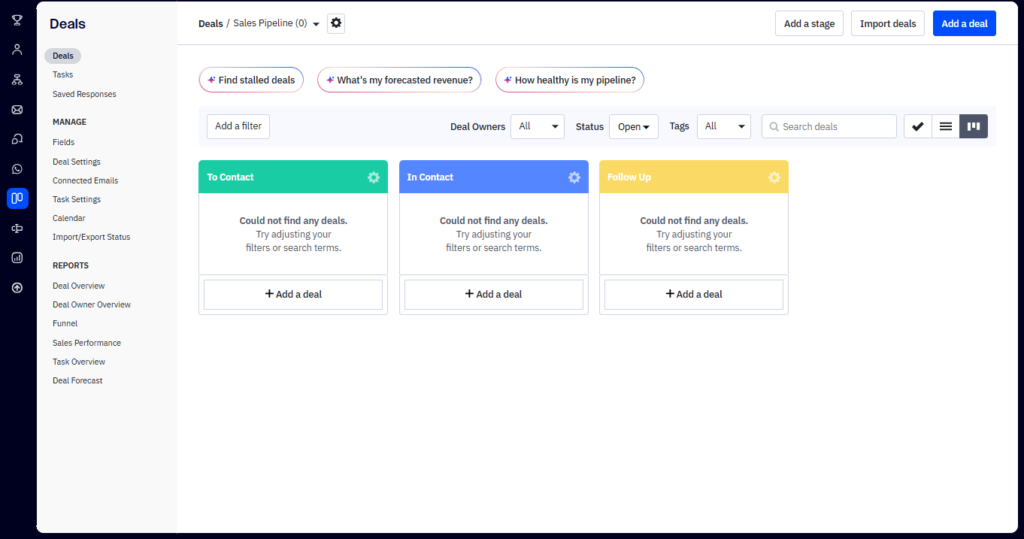
- ActiveCampaign CRM & Contact Management: ActiveCampaign was one of the first email platforms to bundle a CRM. It offers a full-featured sales CRM alongside marketing: you can manage contacts and companies, create sales “deals” with a visual pipeline, assign tasks to team members, and automate sales processes. Contacts in ActiveCampaign can be scored, tagged, and segmented using advanced automation and CRM capabilities based on engagement, lead scores, in-app events, and ecommerce activity.
- The Zapier guide notes that ActiveCampaign’s CRM is “powerful…perfect for sales teams,” letting you tie marketing and sales data together. For instance, you can trigger an email sequence when a deal moves to “proposal sent,” or notify a rep when a lead is ready to buy.
Key differences: MailerLite is essentially an email list manager: contacts, segments, and basic custom fields. It lacks an integrated CRM or pipeline, so it’s not intended as a sales tool. ActiveCampaign is both an email tool and a CRM in one. In real terms, if you’re a small blogger or content creator, MailerLite’s subscriber tools are likely enough. But if you have a sales team or need to track leads through a funnel, ActiveCampaign can replace two or three tools in one, albeit at a higher cost.
The screenshots below highlight MailerLite’s subscriber management interface alongside ActiveCampaign’s built-in CRM, illustrating the different approach each platform takes to contact management.
Landing Pages & Forms
Both MailerLite and ActiveCampaign offer built-in landing page and signup form builders, though their capabilities vary:
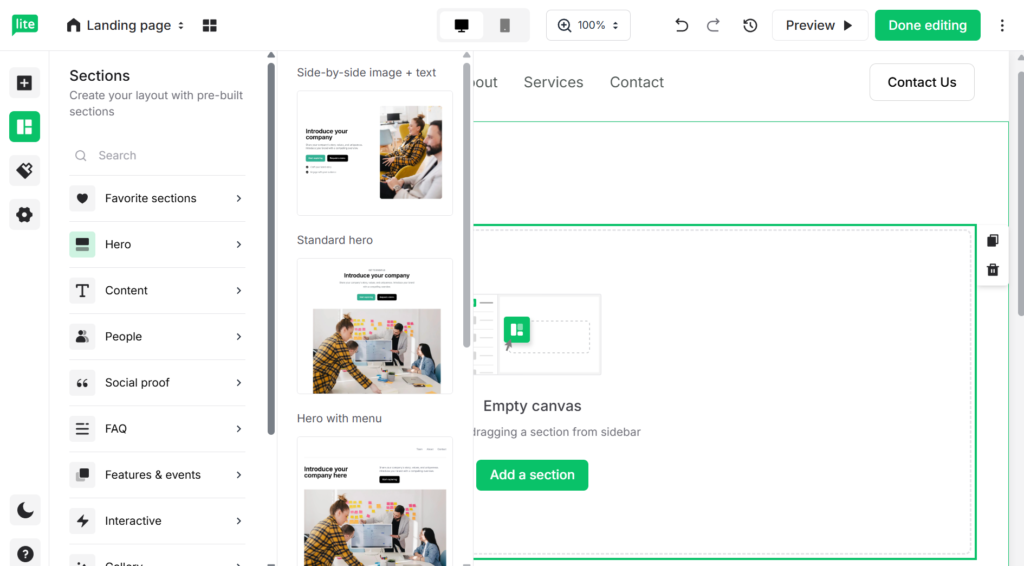
- MailerLite: Landing pages and pop-up forms are a core part of MailerLite’s offering. You can create unlimited websites/landing pages on paid plans. The drag-and-drop landing page editor is simple to use and even includes a free AI content assistant for generating copy/images. MailerLite stands out by also allowing you to build full multi-page websites (with a blog section) – a feature few email platforms offer. According to one reviewer, MailerLite has a “solid landing page and website builder” that is “especially strong” among email tools. Creating pop-up forms (modal, slide-in, etc.) is similarly straightforward. Overall, you can quickly set up lead capture forms and publish landing pages without additional cost or coding.
- ActiveCampaign: ActiveCampaign includes a landing page builder as well, with a set of templates aimed at different goals (e.g. “sell a product,” “collect leads”). Forms in ActiveCampaign can be embedded on your site or published as standalone pages. These forms support conditional logic (show field X only if Y) and can directly trigger automations in ActiveCampaign.
- One downside: ActiveCampaign does not have a site-builder – you can’t create multi-page websites as you can in MailerLite. The Zapier comparison notes that MailerLite’s form and landing tools are simpler and more flexible, while ActiveCampaign’s are “relatively complicated” to set up. For example, publishing an ActiveCampaign form as a landing page involves a few more steps, and there’s no full website or blog feature.
Both platforms support A/B testing of forms/pages and integration with Google Analytics or Facebook Pixel. If building and hosting lightweight marketing sites is important, MailerLite has an edge. If you already have a website and just need simple lead-capture forms and one-off landing pages, either will suffice.
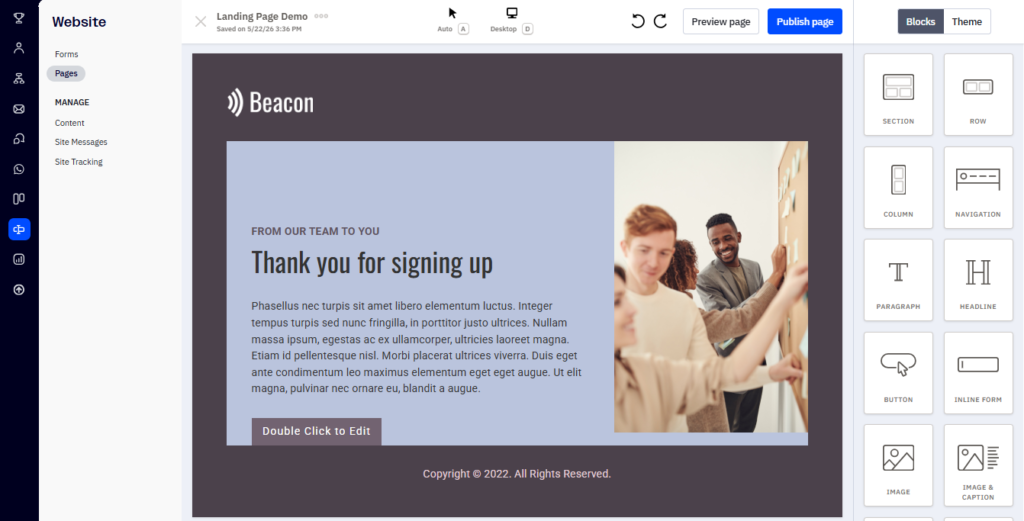
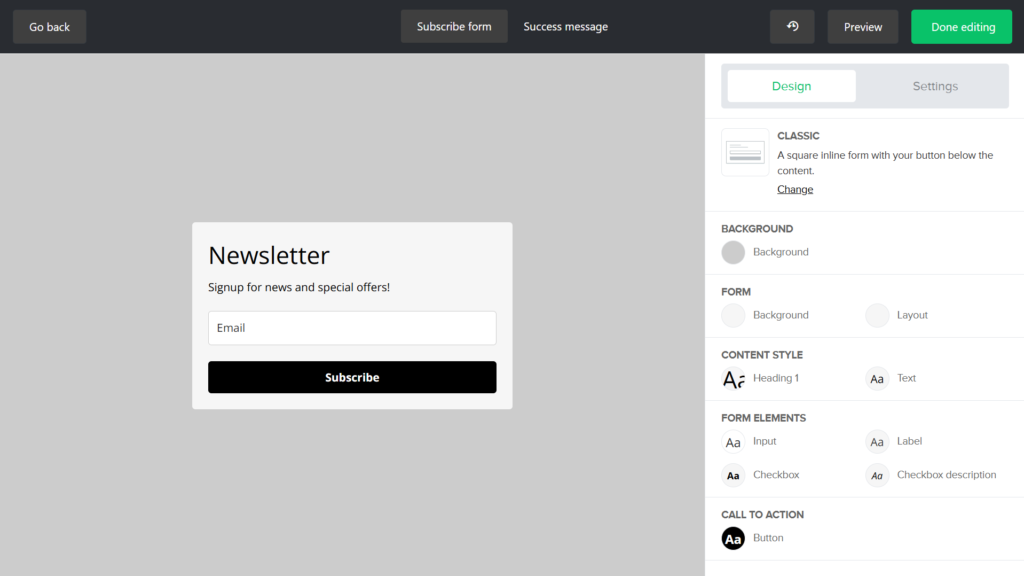
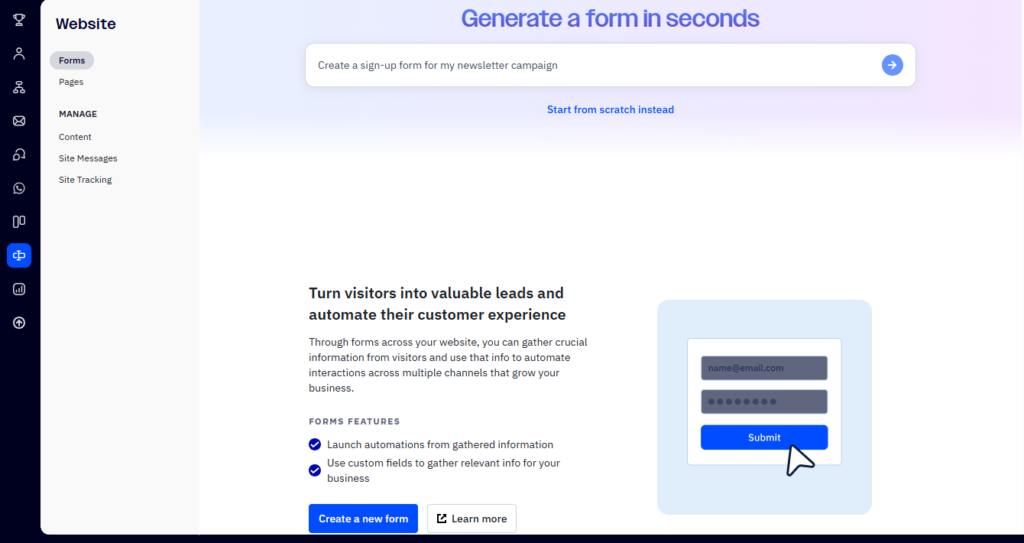
Alongside their landing page builders, MailerLite and ActiveCampaign include built-in form builders designed to simplify lead generation, subscriber collection, and email list growth.
Email Deliverability
Deliverability – the rate at which emails land in subscribers’ inboxes vs. spam folders – is a critical but often overlooked factor. We’ll compare what we know from independent testing and provider practices:
- MailerLite Deliverability: MailerLite markets itself as having “Best of 5 Email Deliverability” in a 2024 industry study. In a recent test by EmailToolTester (Jan 2024), MailerLite achieved an average inbox placement of 80.5% across major ISPs. (About 2.1% went to spam and 8.2% were missing/blocked.) That result earned MailerLite a 4.5-star deliverability rating overall. In fact, MailerLite won multiple “Best Deliverability” awards in prior rounds.
- MailerLite’s infrastructure uses reputable mail servers and enforces strict sender verification (new accounts must be approved before large sends) to maintain a good sending reputation. They also provide features like a built-in unsubscribe page and audience cleaning (inactive cleanup) to keep lists healthy.
- ActiveCampaign Deliverability: ActiveCampaign consistently ranks at the top of deliverability tests. The same Jan 2024 report placed ActiveCampaign with an average 94.2% inbox placement rate (highest of all tools tested). In real terms, almost all ActiveCampaign test emails hit the inbox, with only a tiny fraction (4.1%) in spam. Factors contributing to this include ActiveCampaign’s robust sending domains, support for DMARC/SPF/DKIM, and offering dedicated IPs on higher tiers. ActiveCampaign also provides a deliverability checklist for senders and even a dedicated deliverability support team on enterprise plans.
In practical terms, both platforms perform well, but ActiveCampaign has the measurable edge in deliverability studies. That said, deliverability also depends heavily on your content and list hygiene. The key takeaway is to follow best practices (clean your list, personalize content, authenticate your domain) regardless of platform. Note: If your audience is highly international or corporate, it’s worth testing both. Overall, both platforms provide strong deliverability, although ActiveCampaign achieved a higher inbox placement rate in the referenced independent test. As with any email platform, your results will also depend on list quality, domain authentication, sender reputation, and email content.
Integrations
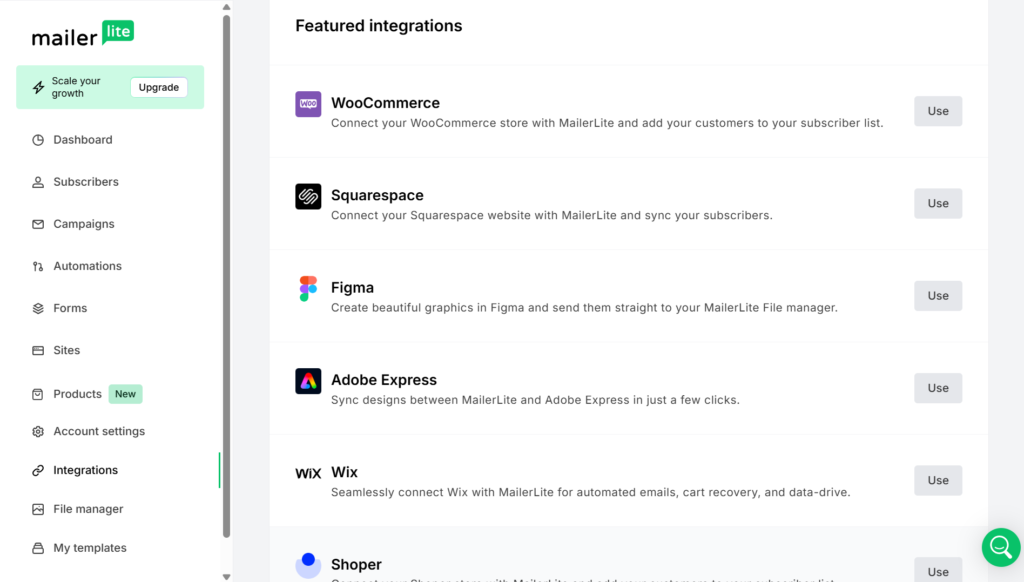
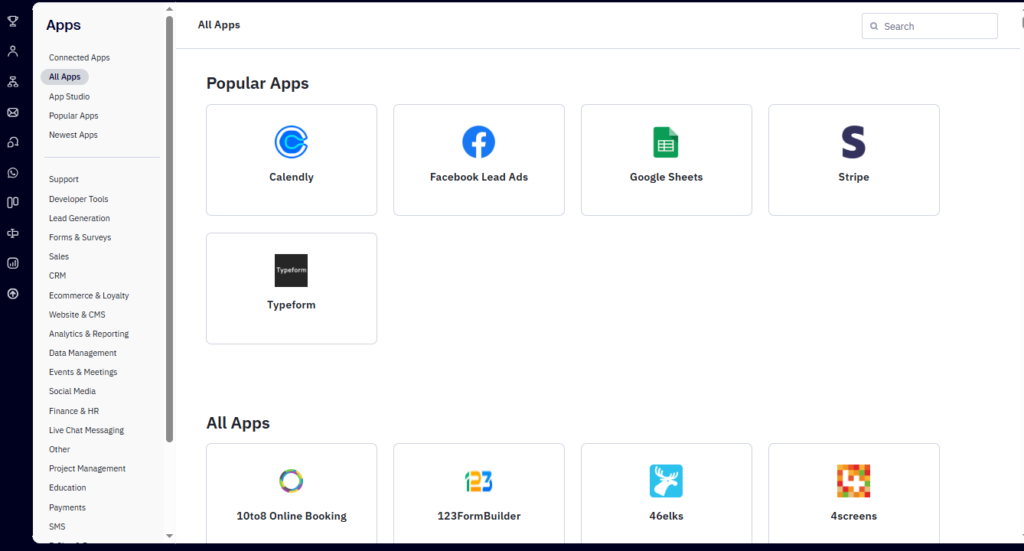
MailerLite integrates with ~130+ apps natively (e.g. Shopify, WooCommerce, Stripe, WordPress). For almost anything else, you can use Zapier (MailerLite connects via Zapier to thousands of other tools). The official pricing page mentions “100+ Integrations”, and reviews note the extensive Zapier support. These cover the typical use cases: ecommerce triggers, CRM sync, webinar tools, etc. MailerLite also offers a public API and webhooks for custom integrations.
ActiveCampaign is famous for its ecosystem: it boasts over 900 built-in integrations, plus also connects via Zapier and has its own API. You’ll find native connectors for CRMs (like Salesforce, HubSpot), ecommerce (Shopify, BigCommerce, WooCommerce), ad platforms (Facebook, Google Ads), webinar services, help desks, and more. Because ActiveCampaign targets larger businesses, its list includes even complex tools like Microsoft Dynamics, Slack, or custom event trackers. In short, if there’s a popular SaaS, there’s a good chance ActiveCampaign can talk to it.
Table: Key Integrations (illustrative)
| Integration Type | MailerLite | ActiveCampaign |
|---|---|---|
| Ecommerce | Shopify, WooCommerce, PrestaShop | Shopify, WooCommerce, BigCommerce, Square, etc. |
| CMS/Website | WordPress, Webhooks | WordPress, Drupal, custom HTML forms, Facebook Lead Ads, etc. |
| Zapier | Yes (connects 5,000+ apps) | Yes (connects 5,000+ apps) |
| Payment/Commerce | Stripe, PayPal, Gumroad (via Stripe) | Stripe, PayPal, plus referral/affiliate tools |
| Webinars/Events | Eventbrite, Zoom (via Zapier) | Eventbrite, Zoom, GoToWebinar (via native or Zapier) |
| Ads & Social | Facebook Custom Audiences integration | Facebook, Google Ads, LinkedIn via Zapier or native |
| CRM | Salesforce, HubSpot (via Zapier); MailerLite has no built-in CRM | Salesforce, HubSpot, Zoho, Microsoft Dynamics, etc. |
Sources: MailerLite and ActiveCampaign official docs.
Key point: Both tools easily connect to top apps through Zapier, but ActiveCampaign has a much larger native integration library. This may sway users who rely on certain business systems (e.g. if you use a specific CRM or sales tool, check if there’s a direct integration). For most standard tasks (sending data from your website or store into the ESP, and vice versa), both platforms can do the job via either native links or Zapier.
Analytics & Reporting
Tracking results is important for any email campaign. Here’s how the two compare:
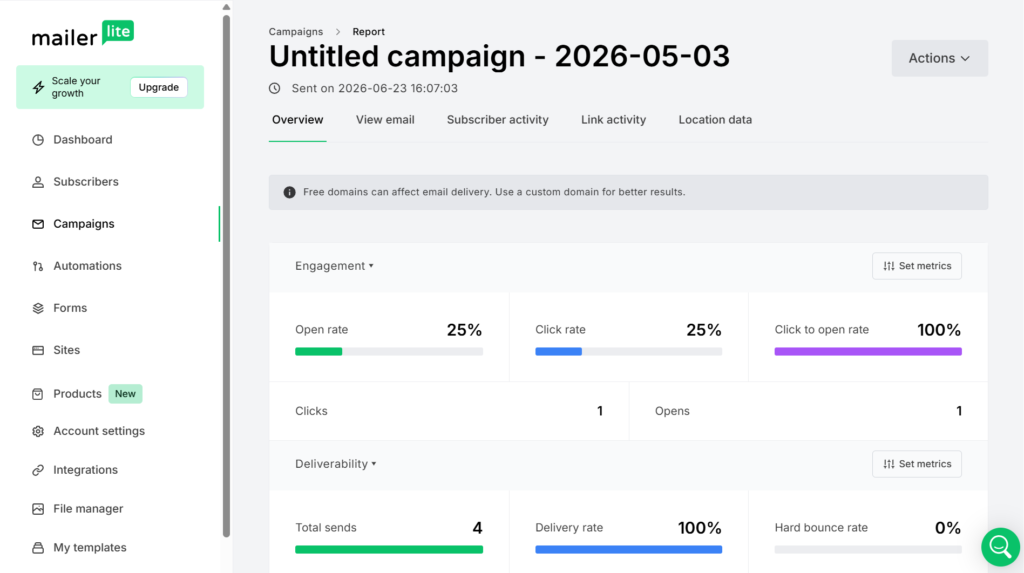
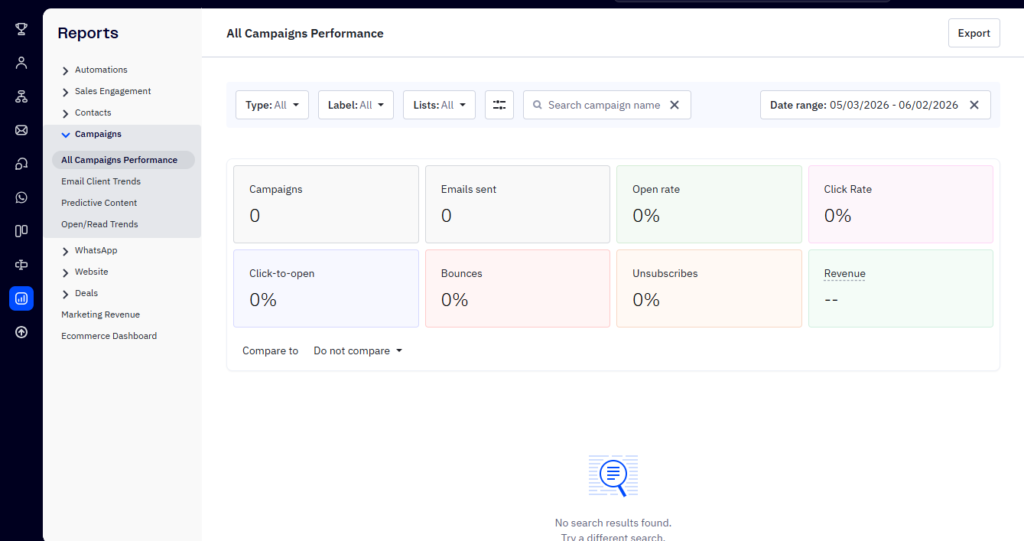
- MailerLite Analytics: MailerLite provides the essential reports: campaign open/click rates, bounce/unsubscribe counts, and subscriber growth over time. The dashboard shows visual graphs of clicks and opens, and you can drill into subscriber profiles to see their history. MailerLite also offers comparative reports (to compare multiple campaigns) and list growth charts. One reviewer notes that MailerLite’s analytics “give you everything you need, but nothing more,” with the data presented in a clear and easy-to-understand format.
- For example, you can see top email clients, domains, and locations of your subscribers. However, MailerLite does not support advanced ecommerce revenue attribution or multi-touch attribution natively.
- ActiveCampaign Analytics: ActiveCampaign shines with depth. It includes all the standard email stats plus advanced features: goal tracking (you can set a conversion goal and see attribution across campaigns/automations), revenue tracking (link orders to campaigns), and CRM reports. The platform has a dedicated reporting section where you can filter by time frame, campaign, or automation, and even build custom reports (especially on Enterprise plans).
- The Zapier guide emphasizes ActiveCampaign’s “endless analytics options,” including marketing revenue, conversion attribution, pipeline activity, and custom goal tracking. For example, you could run a report showing how much revenue was generated from leads who opened a certain email.
Table: Sample Reporting Features
| Feature | MailerLite | ActiveCampaign |
|---|---|---|
| Campaign Dashboard | Yes (opens, clicks, bounces, unsub) | Yes (opens, clicks, geolocation, device, etc.) |
| Automation Reports | Yes (overview of each workflow’s open/click stats) | Yes (visual flow report; goal conversion data) |
| Goal/Conversion Tracking | No (only basic link tracking) | Yes (set goals in automations or campaigns; see funnels) |
| Revenue Tracking (eCommerce) | No (unless manually imported) | Yes (connects with stores; attribute sales to campaigns) |
| Custom Reports/Exports | CSV export of subscriber lists & stats | Yes (custom report builder on higher plans) |
| A/B Testing Analysis | Yes (subject line, content tests) | Yes (in templates and automation split testing) |
| Visual Charts/Graphs | Basic charts on dashboards | Advanced charts, including revenue trends and channel charts |
Key takeaway: For straightforward email metrics (open rate, click rate, unsub, list growth), MailerLite covers the bases well with clear visualization. ActiveCampaign, however, is built to provide a 360° view of the marketing funnel, combining email stats with sales data and custom analytics. If you value deeper insights (e.g. ROI tracking, detailed segmentation reports, pipeline analytics), ActiveCampaign is the stronger choice. If basic email reports suffice, MailerLite is simpler and adequate.
MailerLite vs ActiveCampaign: Pricing
Pricing is often decisive. Both platforms use tiered pricing based on number of contacts, but their structures differ significantly.
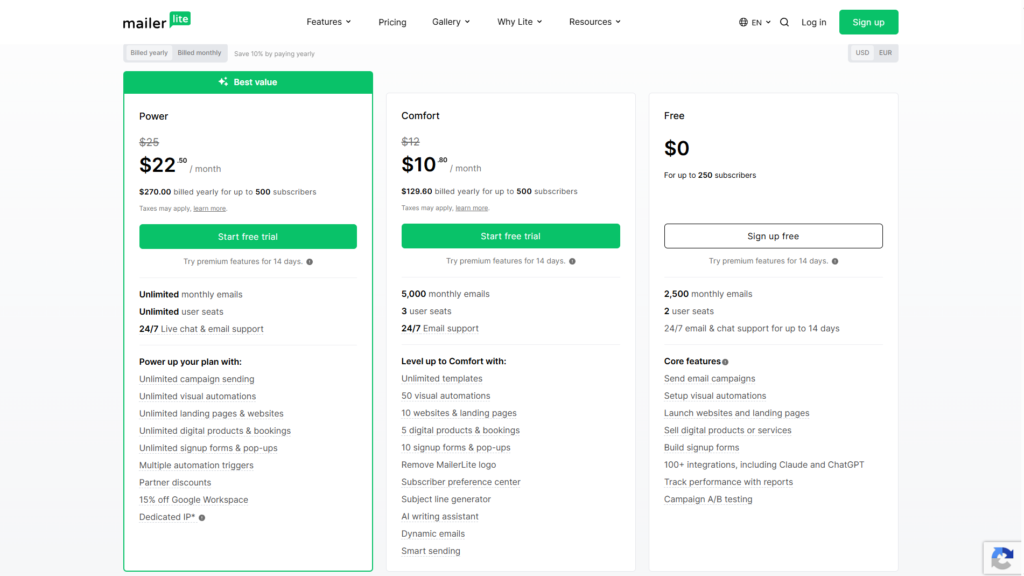
MailerLite Pricing
MailerLite follows a simple and transparent pricing model based primarily on the number of subscribers.
- Free Plan: $0/month for up to 250 subscribers and 2,500 emails per month. Includes almost all features (form builder, automation, email editor, landing pages). No credit card required.
- Comfort Plan: Starts at $10/month (billed annually) and includes 5,000 monthly emails, unlimited templates, A/B testing, advanced segmentation, AI assistant, and other premium features.
- Power Plan: Starts at $22/month (billed annually) for unlimited emails, unlimited user seats, full features plus digital product selling and 24/7 chat support.
- Enterprise Plan: Custom pricing for very large lists (200K+), including a dedicated account manager, deliverability services, and priority support.
Power includes unlimited monthly emails, while Comfort includes 5,000 monthly emails. You can switch plans or move up tiers at any time. Importantly, MailerLite counts only “active” subscribers; unsubscribed or bounced contacts don’t count against your limit.
ActiveCampaign Pricing
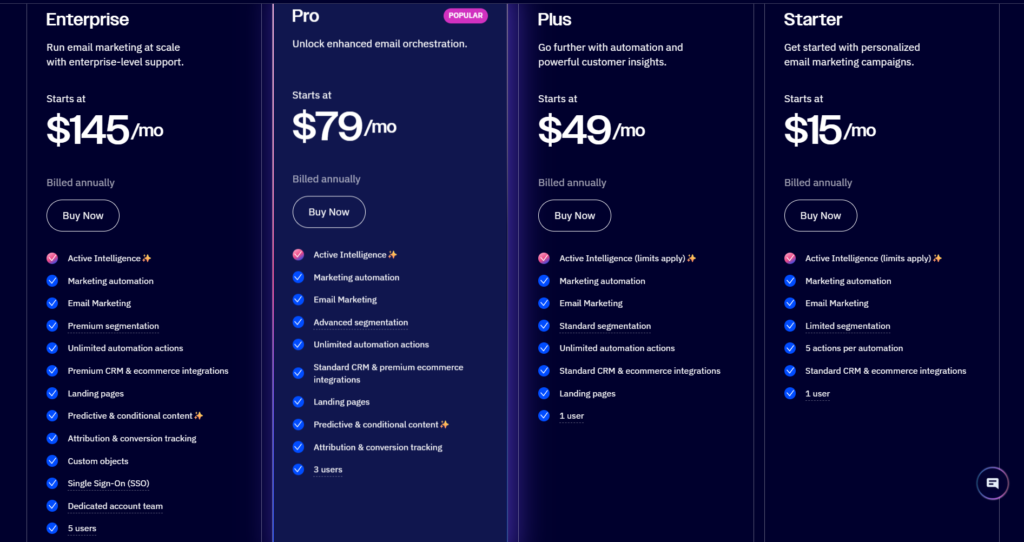
ActiveCampaign’s pricing was overhauled in 2024–2025, so it’s a bit more complex. They now offer four main tiers (plus custom Enterprise) in the Email category, and separate plans if you include WhatsApp marketing. For our purposes, we’ll focus on Email plans:
From the company’s pricing calculator and expert summaries, the tiers for Email marketing are roughly:
- Starter: Starts at $15/month (billed annually) for 1,000 contacts. Includes basic email marketing and multi-step automations, 1 user, and 10x send limit (10,000 sends per month). Key limitations: only 5 actions per automation, limited segmentation, and some features (predictive sending, conditional content, CRM) are not included.
- Plus: Starts at $49/month (billed annually) for 1,000 contacts. Adds marketing & CRM automation, landing pages, e-commerce triggers, and up to 1 user (additional users available as paid add-ons). Automation actions are unlimited. (Notably, SMS and Facebook integration, site tracking, and advanced segmentation come in here.)
- Pro: Starts at $79/month (billed annually) for 1,000 contacts. Adds predictive sending, custom reporting, and up to 3 users (upgrade seats cost extra). Includes AI-powered features and priority support.
- Enterprise: Starts at $145/month (billed annually) for 1,000 contacts. Includes custom features, 5 users, phone support, a dedicated account rep, and other enterprise-level perks.
Pricing increases as your contact list grows, and the exact monthly cost depends on your selected plan and subscriber count. For the latest pricing, visit ActiveCampaign’s official pricing calculator.
Recent changes: ActiveCampaign revised pricing mid-2024, lowering the entry price (Starter became $15 vs old $29 Lite plan) but consolidating features into add-ons. They also now charge new customers for all contacts including unsubscribes and bounces (since Nov 2025), which effectively raises costs if you don’t clean your list.
Pricing Table (selected tiers):
| Plan (Email) | Starting Monthly Price (Annual Billing) | Key Limits/Inclusions |
|---|---|---|
| MailerLite Free | $0 (free) | 250 subscribers, 2,500 emails/month, basic features, 2 user seats |
| MailerLite Comfort | $10 (Annual billing) | 5,000 monthly emails, unlimited templates, 3 users |
| MailerLite Power | $22 (Annual billing) | unlimited monthly emails, unlimited user seats, 24/7 live chat and email support |
| ActiveCampaign Starter | $15 (Annual billing) | 1 user, 5 actions/automation, 10x sends limit (10k sends) |
| ActiveCampaign Plus | $49 (Annual billing) | 1–3 users, unlimited automation, multichannel, landing pages |
| ActiveCampaign Pro | $79 (Annual billing) | 3 users, advanced automations, predictive sending, CRM |
| ActiveCampaign Enterprise | $145 (Annual billing) | 5 users, custom reports, phone support, dedicated team |
Note: Prices shown are starting monthly prices based on annual billing. Actual pricing varies by subscriber count and selected plan. Monthly billing is ~20% higher.
Overall, MailerLite’s paid plans are generally more affordable than ActiveCampaign’s at comparable subscriber levels. While ActiveCampaign offers more advanced automation, CRM functionality, and reporting, MailerLite delivers excellent value for businesses that need essential email marketing features at a lower cost.
Important assumption: These prices are in USD and reflect annual billing rates as of mid-2026. ActiveCampaign’s pricing can be confusing due to add-ons (e.g. Pipelines, Sales CRM features) and per-seat costs. Check the official site or contact sales for exact quotes. Also note that new ActiveCampaign customers should be careful about subscriber list hygiene: since late 2025, AC charges for every contact in your database.
Customer Support
Both vendors promote multi-channel support, but user experiences differ:
- MailerLite Support: All paid MailerLite plans include 24/7 email support and live chat support. In practice, MailerLite is often lauded for its fast, friendly support team. A reviewer remarked that the support was “quick and responsive” during testing. The company is also known for hosting regular webinars and maintaining an active knowledge base. Even the free plan includes email support (though chat is only on paid tiers). Overall, MailerLite’s support gets very positive feedback on Trustpilot/G2.
- ActiveCampaign Support: ActiveCampaign offers email and chat support on most plans, with phone support on Enterprise (and a “premium support” add-on on lower tiers). They also provide extensive documentation and an online community. However, some user reviews note that AC’s support can be “uneven”. According to Appvizer, support responsiveness varies (“some answers lack responsiveness or clarity”). This seems especially true for smaller accounts or during peak times. That said, enterprise customers benefit from dedicated support managers and SLAs.
In short, MailerLite’s support is consistently good and very accessible, especially for small users, while ActiveCampaign’s support is robust but can feel impersonal unless you’re on a high tier. For example, one AC user commented on Reddit that AC support is “great” but mostly via online chat – no 24/7 help desk. If hands-on support is a priority (for example, if you’re not tech-savvy), MailerLite’s customer care might be slightly better in practice.
MailerLite vs ActiveCampaign: Pros and Cons
Below is a concise comparison of the main advantages and limitations of each platform:
| MailerLite | ActiveCampaign |
|---|---|
| Pros: | Pros: |
| – Very affordable pricing; free plan available | – Very powerful automations (950+ templates, AI builder) |
| – Extremely easy to use; clean, uncluttered interface | – Full CRM integration (contacts, deals, pipeline) |
| – Strong email and landing page editors; unlimited emails on paid plans | – Advanced segmentation & personalization (conditional content) |
| – Includes website builder (unique among ESPs) | – Rich integrations (~900+ apps) |
| – 24/7 live chat & email support (even on mid-tier plans) | – Comprehensive analytics (revenue attribution, custom reports) |
| – Strong deliverability track record (awards for best deliverability) | – Built-in SMS, WhatsApp, and social marketing features (advanced) |
| Cons: | Cons: |
| – Limited advanced features: no website tracking triggers, no CRM or pipeline, no AI-generated content templates | – Steep learning curve: interface and workflows can overwhelm newbies |
| – Free plan has no templates (must create emails from scratch) | – Higher cost: plans can be significantly more expensive at comparable subscriber levels. |
| – Less granular reporting; no built-in revenue tracking | – Email send limits: no longer unlimited; overages can be costly |
| – Automation is solid but less sophisticated than AC’s | – Support variability: smaller accounts report slower responses |
| – Less extensive integration library (but Zapier covers most gaps) | – Platform complexity: may be more than needed for basic email tasks |
In short, MailerLite’s strengths are simplicity, value, and core email features. Its weaknesses are the lack of a true CRM and some advanced automation triggers. ActiveCampaign’s strengths are its advanced power (automation, CRM, analytics), while weaknesses are cost, complexity, and recent pricing changes (e.g. send limits and contact fees). We have flagged key factors like ActiveCampaign’s new “send limits” policy which can surprise users.
MailerLite vs ActiveCampaign: Which One Should You Choose?
Choosing between MailerLite and ActiveCampaign largely comes down to your use case and budget:
- Choose MailerLite if: You’re a small business, freelancer, blogger, or creative with a limited budget. You need an easy-to-use email solution with no-cost entry (free up to 250 subscribers), built-in landing pages/websites, and reliable automations for a growing list. MailerLite will handle newsletters, drip sequences, lead magnets, and simple ecommerce funnels well. Its analytics cover the essentials, and deliverability is strong. (In other words, if you want a straightforward way to email your audience without unnecessary bells and whistles, MailerLite is ideal.)
- Choose ActiveCampaign if: You are an enterprise, an agency, or a business that relies on sophisticated marketing and sales workflows. If you need an integrated CRM (to manage leads, deals, and communications in one place) or highly customized automations (site tracking, predictive sending, complex segment triggers), AC is better. Also choose AC if you run ecommerce at scale and need features like abandoned cart recovery or wishlist triggers (their Shopify integration is deeper). The trade-off: ActiveCampaign comes at a higher price and requires some onboarding, but it can deliver a larger ROI for businesses that leverage its advanced features fully.
A key consideration is growth: MailerLite scales up to mid-sized lists easily (and has an enterprise tier), but beyond ~100k subscribers, ActiveCampaign’s infrastructure and dedicated support might provide smoother operation. On the other hand, if your list is small (<10k) and you don’t need dozens of users or complicated workflows, MailerLite gives the same core tools at a fraction of the price.
Final Verdict
MailerLite and ActiveCampaign serve different types of email marketing users. MailerLite excels at simplicity, affordability, and covering basic to moderately advanced needs with an excellent free tier. It’s a top pick for new email users and small teams that want results without complexity. ActiveCampaign excels at depth: if you need multi-channel campaigns, integrated sales CRM, and sophisticated analytics (and have the budget to match), it’s hard to beat.
By examining every facet – from the intuitive MailerLite UI to the powerhouse ActiveCampaign automations, from pricing tiers to deliverability – we’ve provided the data you need. We encourage you to consider your specific use case: budget, list size, team size, and technical comfort. Then pick the tool whose advantages align with those needs. Either way, both are market leaders and can do the job; this comparison should make clear which one is the best fit for you.
Frequently Asked Questions
- Which is better for beginners: MailerLite or ActiveCampaign?
MailerLite is generally easier for beginners. Its interface is simple and it even offers a free plan. ActiveCampaign has more features, so it can be overwhelming at first. - Is MailerLite good for large lists and enterprises?
MailerLite can scale (up to 200K+ in its Enterprise plan), but it’s mainly geared to small/midsize lists. Enterprises often prefer ActiveCampaign for its dedicated infrastructure and advanced CRM. - Which has better email deliverability?
Both have strong deliverability practices, but tests show ActiveCampaign has a slightly higher inbox rate (≈94% vs MailerLite’s ≈80% in Jan 2024). In practice, both are very good if you follow best practices. - Can I migrate from ActiveCampaign to MailerLite (or vice versa)?
Yes. MailerLite even provides guides for moving data from other systems. Generally, you export contacts and campaigns, and rebuild automations in the new platform. Keep in mind differences in features during migration. - Which is more cost-effective for 5,000 contacts?
For businesses with around 5,000 contacts, MailerLite generally offers significantly lower pricing than ActiveCampaign while still providing the core email marketing features most businesses need. ActiveCampaign typically costs considerably more at this subscriber level because of its advanced automation, CRM, and enterprise-focused capabilities.
Related Email Marketing Guides
MailerLite vs Mailchimp
Mailchimp vs ActiveCampaign