
MailerLite vs Mailchimp is one of the most searched comparisons when choosing an email marketing platform—and for good reason. Both tools are popular, powerful, and widely used by businesses, bloggers, and marketers around the world.
But which one is actually better for your needs?
In this detailed comparison, we’ll break down MailerLite vs Mailchimp across key factors like ease of use, features, pricing, automation, and more. By the end, you’ll clearly understand which platform fits your goals and budget, so you can make the right decision without confusion.
Table of Contents
Ease of Use & Interface
When comparing MailerLite vs Mailchimp, ease of use is one of the most important factors—especially if you’re a beginner or running a small business without technical experience. Both platforms offer user-friendly interfaces, but they differ in how quickly you can get started and how intuitive their tools feel.
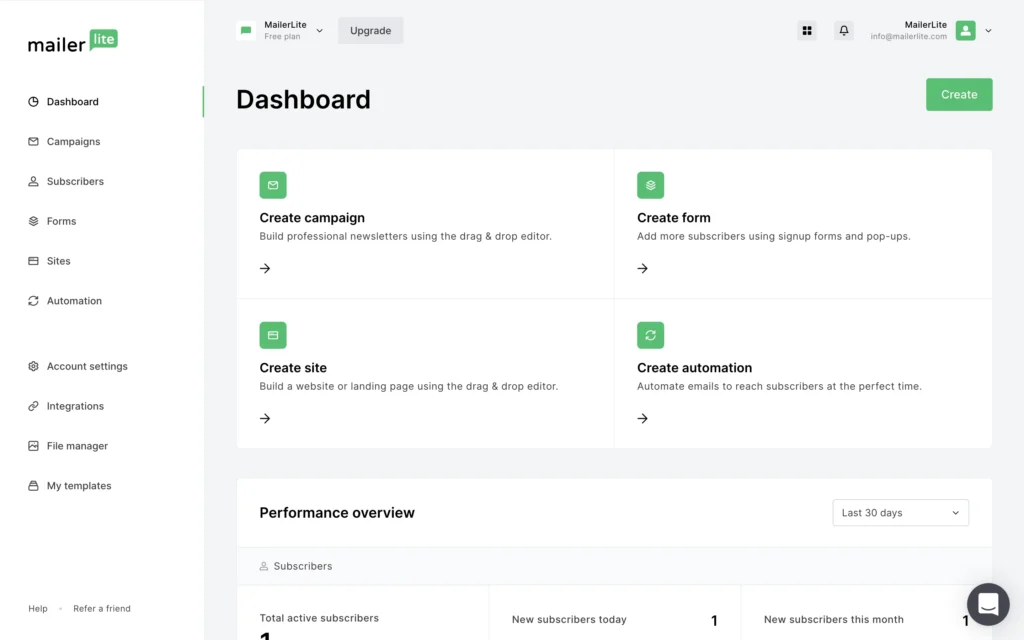
MailerLite is known for its clean and minimal dashboard. Everything is clearly labeled, and you won’t feel overwhelmed when you log in for the first time. The navigation is simple, making it easy to find campaigns, subscribers, and automation tools without confusion.
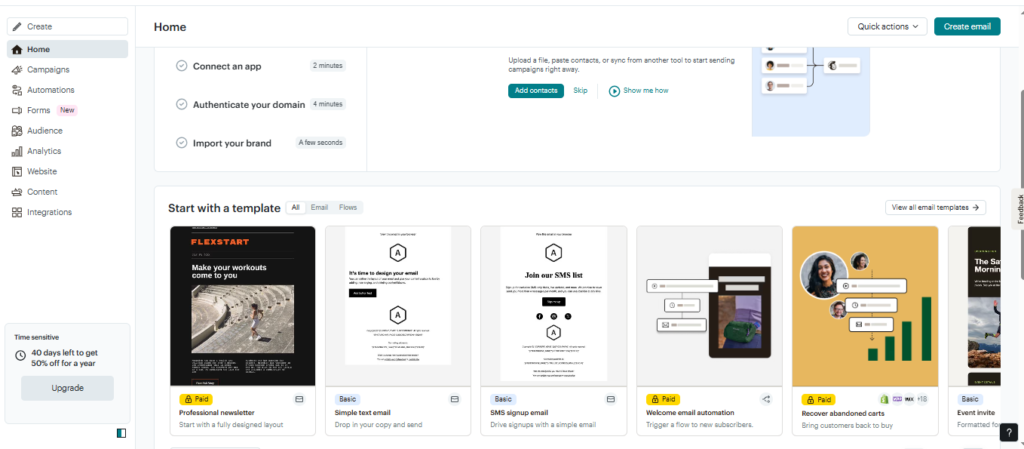
Mailchimp, on the other hand, has a more feature-rich dashboard, which can feel slightly complex for beginners. While it looks professional and powerful, new users may need some time to understand where everything is located.
Setup Process
MailerLite offers a quick and straightforward setup process. Signing up, verifying your account, and creating your first campaign is fast and smooth.
Mailchimp also has a guided setup, but because of its broader range of features, the process can feel a bit longer and more detailed.
Ease of Creating Campaigns
Creating campaigns in MailerLite is simple thanks to its drag-and-drop editor and uncluttered interface. You can quickly add text, images, and buttons without any confusion.
Mailchimp also offers a powerful drag-and-drop editor, but it includes more customization options, which can sometimes make the process feel slightly more complicated for beginners.
Email Editor & Templates
When comparing MailerLite vs Mailchimp, the email editor and templates play a huge role in how easily you can design professional-looking campaigns. Both platforms offer drag-and-drop builders, but they differ in simplicity, flexibility, and template variety.
Drag-and-Drop Email Builder
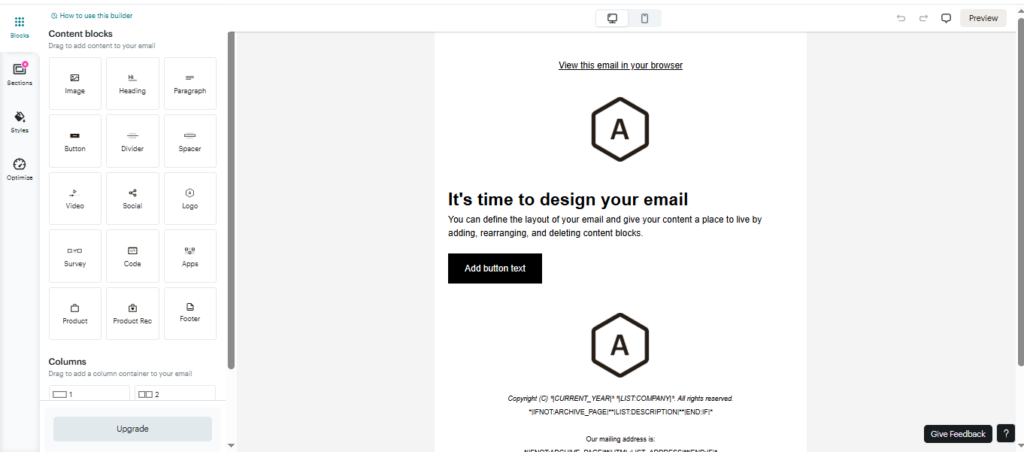
MailerLite provides a simple and clean drag-and-drop editor that is perfect for beginners. You can easily add elements like text, images, buttons, and videos without any confusion. The interface is fast, responsive, and focuses on getting your email ready quick.
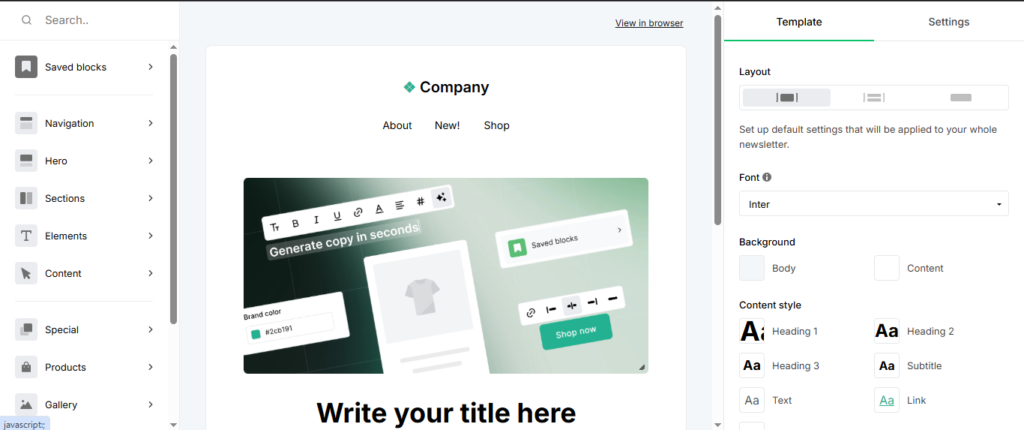
Mailchimp also offers a powerful drag-and-drop builder, but it includes more advanced customization options. While this gives you greater control over design, it can feel slightly overwhelming for new users.
Template Variety & Design Quality
In the MailerLite vs Mailchimp comparison, Mailchimp clearly stands out in terms of template variety. It offers a wide range of professionally designed templates suitable for different industries like eCommerce, blogs, and businesses.
MailerLite, on the other hand, provides fewer templates, but they are modern, clean, and highly effective for most use cases. The focus is more on simplicity rather than variety.
Customization Options
MailerLite allows you to customize templates easily, but it keeps things straightforward and limited, which is ideal for users who don’t want too many design decisions.
Mailchimp offers advanced customization features, including more control over layout, styling, and branding. This makes it a better option for users who want highly customized email designs.
Mobile Responsiveness
Both MailerLite and Mailchimp ensure that emails are mobile-friendly by default. You don’t need to worry about how your emails will look on smartphones or tablets.
However, Mailchimp provides more preview and testing options, allowing you to see exactly how your email will appear on different devices before sending.
Automation Features
When comparing MailerLite vs Mailchimp, automation features are crucial for saving time and growing your email marketing efficiently. Automation allows you to send emails based on user actions, such as sign-ups, clicks, or purchases. Both platforms offer strong automation tools, but they differ in complexity and flexibility.
Automation Workflow Builder
MailerLite provides a simple and visual automation builder that is easy to understand, even for beginners. You can create workflows using triggers like “when a user subscribes” and then add steps such as sending emails or delays.
Mailchimp also offers a visual automation builder, but it is more advanced and includes additional options. This makes it powerful but slightly more complex compared to MailerLite.
Triggers & Conditions
In the MailerLite vs Mailchimp comparison, Mailchimp offers more advanced triggers and conditions. You can create highly targeted workflows based on user behavior, purchase activity, or engagement.
MailerLite includes essential triggers such as subscriber actions, email opens, and clicks. While it covers most basic needs, it may feel limited for advanced marketers.
Pre-Built Automation Templates
MailerLite provides basic automation templates like welcome emails, onboarding sequences, and simple campaigns. These are easy to set up and perfect for beginners.
Mailchimp offers a wider range of pre-built automation templates, especially for eCommerce and customer journeys. This makes it easier to launch more complex campaigns quickly.
Advanced Automation Capabilities
MailerLite focuses on simplicity and efficiency, which means fewer advanced features but easier setup and management.
Mailchimp, however, excels in advanced automation, including customer journey mapping, behavioral targeting, and deeper segmentation. This makes it more suitable for businesses that need detailed and complex automation workflows.
Ease of Managing Automations
MailerLite makes it easy to manage automations with a clean interface and straightforward controls. You can quickly edit workflows without confusion.
Mailchimp provides more control but can feel slightly overwhelming due to the number of options and settings available.
Pricing & Plans
When comparing MailerLite vs Mailchimp, pricing is one of the biggest deciding factors—especially if you’re starting a blog or small business. Both platforms offer free plans and paid tiers, but they differ significantly in cost, value, and what you get for your money.
Free Plan Comparison
In the MailerLite vs Mailchimp comparison, both tools offer a free plan, but MailerLite provides more value upfront.
MailerLite’s free plan allows you to manage up to around 500 subscribers and send thousands of emails monthly, along with access to essential features like automation and landing pages.
Mailchimp’s free plan is more limited, supporting only about 250 contacts and 500 monthly emails, with many advanced features locked behind paid plans.
Paid Plans & Pricing Structure
MailerLite is known for its affordable and transparent pricing. Paid plans start at around $9–$18/month, and costs increase gradually based on the number of subscribers.
Mailchimp, on the other hand, is more expensive, with plans starting around $6.50/month (Essentials) and increasing up to $175/month significantly for advanced features.
For example, at around 10,000 subscribers, MailerLite costs significantly less compared to Mailchimp’s higher pricing tiers.
“MailerLite Pricing And Plans”
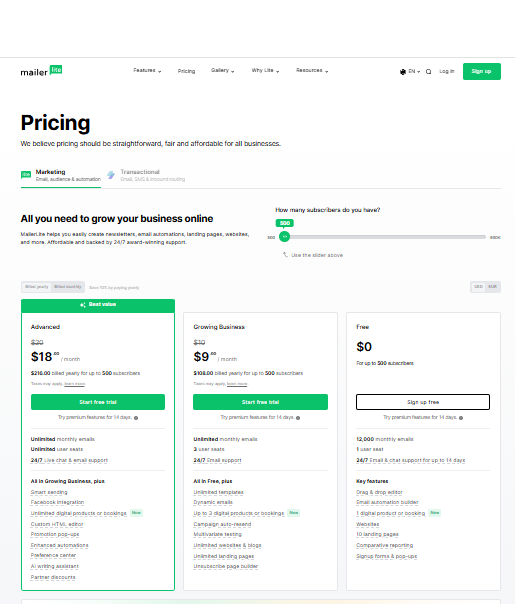
MailerLite offers one of the most affordable pricing structures in the email marketing industry, making it an excellent choice for beginners and small businesses.
The free plan allows up to 500 subscribers and includes essential features such as email campaigns, landing pages, and basic automation. This makes it a strong starting point for anyone who wants to build an email list without spending money.
As your business grows, the paid plans start at a low monthly cost and unlock more advanced features like unlimited emails, automation workflows, and priority support.
Overall, MailerLite stands out for its simplicity, transparency, and great value for money compared to many competitors.
“Mailchimp Pricing And Plans”
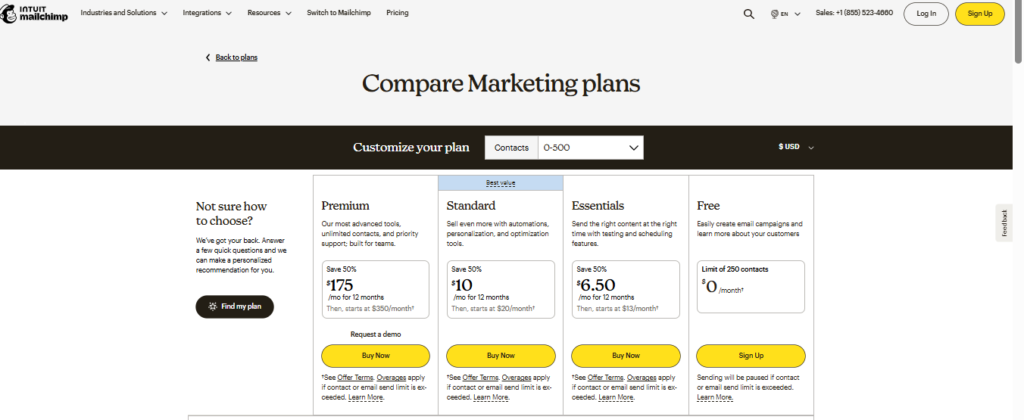
Mailchimp’s pricing structure shows a clear focus on scalability and advanced features. However, as shown in the images above, many essential tools are locked behind higher-tier plans, which can quickly increase costs as your email list grows.
Compared to MailerLite, Mailchimp is more feature-rich but also more expensive, making it more suitable for growing businesses rather than beginners.
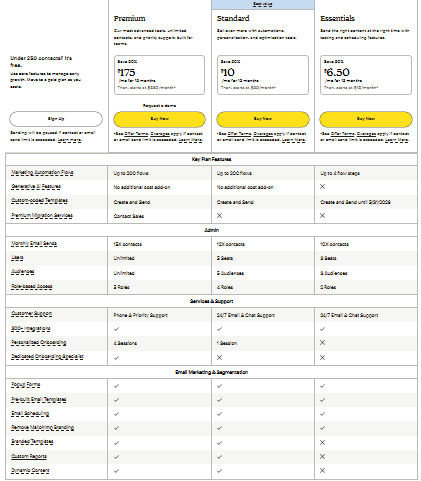
Mailchimp offers a range of pricing plans designed for different business sizes, but its structure can feel more complex compared to other tools.
While it provides powerful features such as advanced automation and analytics, many of these are locked behind higher-tier plans. The free plan is quite limited, especially in terms of contacts and automation capabilities.
As your subscriber list grows, the cost increases significantly, making Mailchimp a more expensive option in the long run.
Overall, Mailchimp is suitable for businesses that need advanced features, but it may not be the most cost-effective choice for beginners.
Value for Money
In the MailerLite vs Mailchimp pricing comparison, MailerLite clearly offers better value for money. It includes many core features in lower-tier plans without forcing users to upgrade early.
Mailchimp provides powerful features, but many of them are only available in higher-tier plans, which increases the total cost over time.
Additionally, Mailchimp may charge based on total contacts (including unsubscribed users), which can increase costs unexpectedly.
MailerLite keeps pricing more straightforward, focusing only on active subscribers.
Email Sending Limits
MailerLite often offers unlimited email sending on paid plans, which is a big advantage for growing businesses.
Mailchimp usually applies sending limits and potential extra costs, depending on your plan and usage.
Hidden Costs & Scalability
MailerLite has predictable pricing, making it easier to budget as your business grows.
Mailchimp, while powerful, can become expensive at scale, especially when you need advanced automation, analytics, or larger subscriber lists.
Deliverability Rates
When comparing MailerLite vs Mailchimp, deliverability is a critical factor. It doesn’t matter how good your emails look—if they don’t reach the inbox, your campaigns won’t perform. Deliverability refers to how successfully your emails land in subscribers’ inboxes instead of spam folders.
Overall Deliverability Performance
Both MailerLite and Mailchimp have strong deliverability reputations. They use established sending infrastructures, authentication protocols (like SPF, DKIM), and spam monitoring systems to ensure emails are delivered properly.
In most independent tests, both platforms perform consistently well, with high inbox placement rates. For the average user, the difference between MailerLite vs Mailchimp in deliverability is very small.
Spam Filtering & Inbox Placement
In the MailerLite vs Mailchimp comparison, both tools actively work to keep emails out of spam folders. They monitor sender behavior, enforce anti-spam policies, and help maintain a good sender reputation.
Mailchimp is slightly more strict with its policies, which can be beneficial for maintaining high deliverability but may sometimes restrict accounts if guidelines are not followed.
MailerLite is also reliable but tends to be more flexible, making it easier for beginners to operate without strict limitations.
Email Authentication & Security
Both MailerLite and Mailchimp support important email authentication methods like:
- SPF (Sender Policy Framework)
- DKIM (DomainKeys Identified Mail)
These help verify your emails and improve inbox placement.
Mailchimp provides more guided setup and advanced options, while MailerLite keeps the process simple and beginner-friendly.
Impact of User Behavior
In the MailerLite vs Mailchimp comparison, deliverability also depends heavily on how you use the platform. Factors like:
- Email list quality
- Open rates
- Spam complaints
- Engagement levels
Both tools reward good practices and may limit performance if you send spammy or low-quality emails.
Deliverability Tools & Insights
MailerLite provides basic deliverability insights, such as open rates, click rates, and bounce tracking.
Mailchimp offers more detailed reporting and recommendations, helping users improve their campaigns and maintain strong deliverability over time.
MailerLite covers these basics very well and is designed for simple and efficient email marketing. It also includes landing pages, pop-ups, and forms within the platform.
Mailchimp also offers these features but goes further with advanced segmentation and campaign tools, making it more suitable for complex marketing strategies.
“MailerLite vs Mailchimp features comparison table”
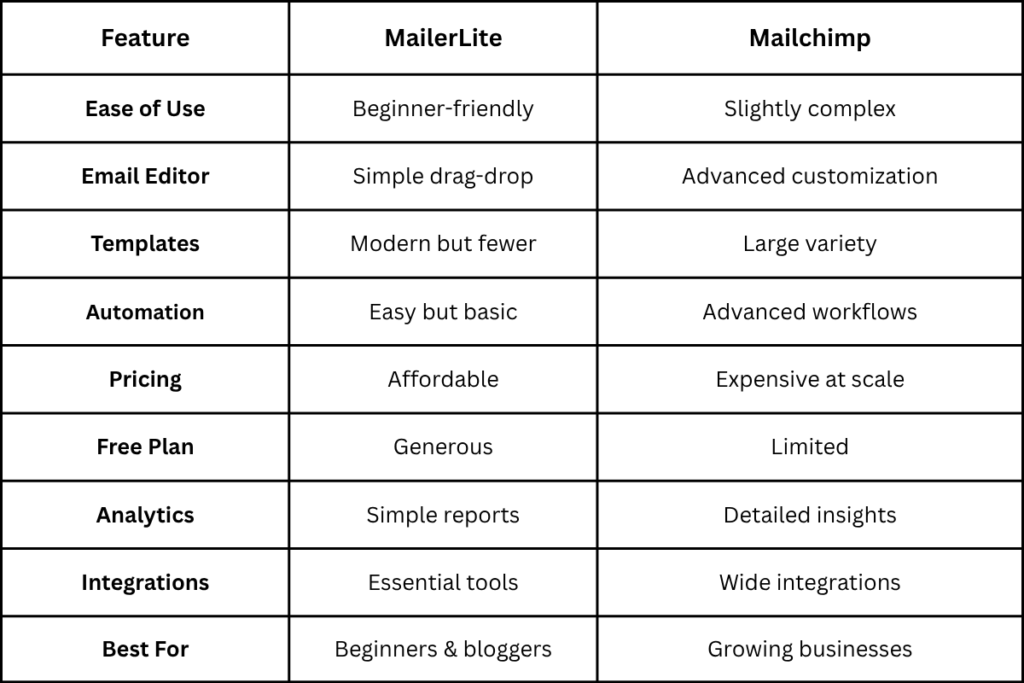
Overall, Mailchimp offers more features, while MailerLite focuses on simplicity.
Analytics & Reporting
When comparing MailerLite vs Mailchimp, analytics and reporting help you understand how your email campaigns are performing. Good reporting allows you to track what’s working, improve your strategy, and increase conversions. Both platforms provide useful insights, but they differ in depth and complexity.
Key Metrics & Performance Tracking
In the MailerLite vs Mailchimp comparison, both tools track essential email marketing metrics such as:
- Open rates
- Click-through rates
- Bounce rates
- Unsubscribes
MailerLite presents these metrics in a simple and easy-to-read format, making it ideal for beginners.
Mailchimp also tracks these metrics but provides more detailed breakdowns and advanced data insights, which are useful for experienced marketers.
Reporting Dashboard & User Experience
MailerLite offers a clean and straightforward reporting dashboard. You can quickly see how your campaigns are performing without getting overwhelmed by too much data.
Mailchimp’s dashboard is more feature-rich and detailed, but it can feel slightly complex for new users due to the number of available reports and data points.
Advanced Analytics Features
In the MailerLite vs Mailchimp comparison, Mailchimp stands out with advanced analytics tools, including:
- Audience insights
- Comparative reports
- Engagement trends over time
MailerLite focuses on basic but essential analytics, which are enough for most small businesses and bloggers.
A/B Testing Insights
Both MailerLite and Mailchimp support A/B testing, allowing you to test subject lines, content, or send times.
MailerLite keeps A/B testing simple and easy to understand, showing clear results.
Mailchimp provides more detailed testing insights, helping you analyze performance more deeply.
Customization & Flexibility
When comparing MailerLite vs Mailchimp, customization and flexibility determine how much control you have over your email designs, campaigns, and overall marketing setup. Both platforms allow customization, but they differ in how advanced and flexible their options are.
Email Design Customization
In the MailerLite vs Mailchimp comparison, both tools let you customize emails using drag-and-drop editors.
MailerLite focuses on simple and clean customization. You can easily change colors, fonts, layouts, and add elements without complexity. This is ideal for users who want quick and professional designs.
Mailchimp offers more advanced design control, allowing deeper customization of layouts and branding. You can fine-tune almost every element, which is useful for businesses with strict design requirements.
Segmentation & Personalization
In the MailerLite vs Mailchimp comparison, personalization is an important part of flexibility.
MailerLite allows basic segmentation and personalization, such as targeting users based on behavior or engagement.
Mailchimp offers advanced segmentation and personalization, including detailed audience targeting and dynamic content.
Integration Flexibility
MailerLite supports essential integrations, but customization options through integrations are somewhat limited.
Mailchimp offers greater flexibility through integrations and add-ons, allowing users to expand functionality and connect with many external tools.
Scalability
When comparing MailerLite vs Mailchimp, scalability is important if you plan to grow your email list and business over time. A scalable platform should handle more subscribers, advanced campaigns, and increasing complexity without slowing you down.
Growth of Subscriber Lists
In the MailerLite vs Mailchimp comparison, both platforms can handle growing email lists, from a few hundred subscribers to thousands.
MailerLite is ideal for small to medium-sized lists, offering affordable pricing as your subscribers grow. It performs well for bloggers, startups, and small businesses.
Mailchimp, however, is built to handle larger and more complex audiences. It is better suited for businesses expecting rapid growth or already managing large subscriber bases.
Pricing at Scale
MailerLite remains cost-effective as your list grows, which is a major advantage for small businesses.
Mailchimp becomes significantly more expensive at higher subscriber levels, especially when using advanced features.
Suitability for Different Business Sizes
MailerLite is best for:
- Beginners
- Bloggers
- Small to medium businesses
Mailchimp is better for:
- Growing businesses
- Large companies
- Advanced marketing teams
Pros and Cons
When comparing MailerLite vs Mailchimp, looking at the pros and cons helps you quickly understand which platform fits your needs. Both tools are powerful, but they serve slightly different types of users.
MailerLite Pros
In the MailerLite vs Mailchimp comparison, MailerLite stands out for its simplicity and affordability.
- Easy to use, beginner-friendly interface
- Affordable pricing with good value
- Generous free plan
- Clean and fast email editor
- Built-in tools like landing pages and forms
MailerLite Cons
While MailerLite is strong in simplicity, it has some limitations.
- Fewer advanced features compared to Mailchimp
- Limited template variety
- Fewer integrations
- Basic analytics and automation for advanced users
Mailchimp Pros
In the MailerLite vs Mailchimp comparison, Mailchimp stands out for its advanced capabilities.
- Wide range of features and tools
- Large template library
- Advanced automation and segmentation
- Strong analytics and reporting
- Extensive integrations
Mailchimp Cons
Despite its strengths, Mailchimp has some drawbacks.
- Higher pricing, especially as you scale
- Limited features on the free plan
- Slightly complex interface for beginners
- Some support options only available on higher plans
Use Cases
When comparing MailerLite vs Mailchimp, understanding the use cases helps you decide which platform fits your specific needs. Both tools are powerful, but they are designed for slightly different types of users and business goals.
Best for Beginners & Bloggers
In the MailerLite vs Mailchimp comparison, MailerLite is the better choice for beginners and bloggers.
MailerLite offers a simple interface, easy setup, and affordable pricing, making it perfect for:
- New bloggers
- Personal websites
- Small content creators
You can quickly create email campaigns, build landing pages, and grow your audience without technical skills.
Best for Small Businesses
MailerLite is also ideal for small businesses that want to manage email marketing without spending too much.
It provides all essential tools like:
- Email campaigns
- Automation
- Subscriber management
Mailchimp can also be used by small businesses, but its higher pricing and complexity may not be necessary at an early stage.
Best for Growing Businesses
In the MailerLite vs Mailchimp comparison, Mailchimp becomes more useful as your business grows.
Mailchimp is suitable for:
- Businesses with growing email lists
- Teams managing multiple campaigns
- Users needing more advanced tools
Its automation, segmentation, and analytics help manage more complex marketing strategies.
Best for eCommerce & Advanced Marketing
Mailchimp is the better choice for eCommerce businesses and advanced marketers.
It offers:
- Deeper customer insights
- Advanced automation workflows
- Multi-channel marketing features
MailerLite supports eCommerce, but it is more focused on basic selling and simple campaigns.
Best for Budget-Conscious Users
In the MailerLite vs Mailchimp comparison, MailerLite is clearly better for users with a limited budget.
It offers:
- Lower pricing
- More features in the free plan
- Better value for small users
Final Verdict
After comparing all the key factors, both MailerLite and Mailchimp prove to be powerful email marketing tools—but they are designed for different types of users.
The decision ultimately comes down to your needs, budget, and experience level.
MailerLite stands out for its simplicity, affordability, and ease of use, making it the ideal choice for beginners, bloggers, and small businesses. It offers all the essential features without overwhelming you or increasing your costs too quickly.
Mailchimp, on the other hand, is a more advanced and feature-rich platform. It is better suited for growing businesses, eCommerce stores, and marketers who need deeper automation, detailed analytics, and a wider range of integrations.
Final Recommendation:
For most users especially beginners MailerLite is the better choice due to its simplicity, lower pricing, and user-friendly interface.
Quick Decision Guide
- Choose MailerLite if:
- You want a beginner-friendly platform
- You prefer lower pricing
- You need a simple and clean interface
- Choose Mailchimp if:
- You need advanced automation
- You run a growing or large business
- You want more integrations and analytics
- Get Started:
- If you’re just starting out, try MailerLite’s free plan today and start building your email list with ease.